


Share feedback directly with Fabric product managers, participate in targeted research studies and influence the Fabric roadmap.
Sign up nowGet Fabric certified for FREE! Don't miss your chance! Learn more
Hi all
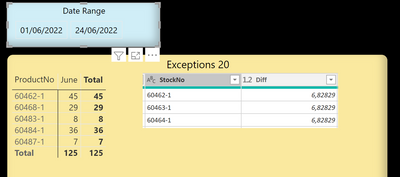
the screen shot below displays:
1) a matrix visual
2) a table
The content in the Matrix is generated by a measure. The column June will display the products sold in June.
The table stores a price difference for each of those products.
The Sales table and the price difference table are related, through the Product No field.
I am attempting to write a formula or another solution where the quantity of each product sold in the period is multiplied by the price difference. However, each time the result seems to aggregate the price difference column.
Any help, please?
Hi all
Solved! Go to Solution.
@EVEAdmin hard to write the exact formula with the data supplied, but basically you need something like:
measure = SUMX('Sales', 'Sales'[Quatntity] * RELATED('Store'[difference]))
@EVEAdmin hard to write the exact formula with the data supplied, but basically you need something like:
measure = SUMX('Sales', 'Sales'[Quatntity] * RELATED('Store'[difference]))
@SpartaBI thank you very much,
even though the data supplied were limited, you provided the solution I needed, very quickly.
Appreciated.
@EVEAdmin my pleasure 🙂
Hey, check out my showcase report - got some high level stuff there. Sure you will find there a lot of cool ideas.
https://community.powerbi.com/t5/Data-Stories-Gallery/SpartaBI-Feat-Contoso-100K/td-p/2449543
Give it a thumbs up over there if you liked it 🙂
If you love stickers, then you will definitely want to check out our Community Sticker Challenge!
Check out the January 2026 Power BI update to learn about new features.
| User | Count |
|---|---|
| 61 | |
| 58 | |
| 45 | |
| 21 | |
| 18 |
| User | Count |
|---|---|
| 122 | |
| 119 | |
| 37 | |
| 35 | |
| 29 |