Don't miss your chance to take the Fabric Data Engineer (DP-700) exam on us!
Learn moreWe've captured the moments from FabCon & SQLCon that everyone is talking about, and we are bringing them to the community, live and on-demand. Starts on April 14th. Register now
Hi Everyone,
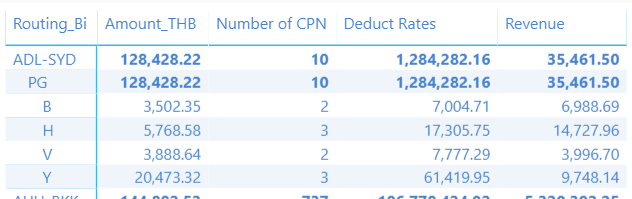
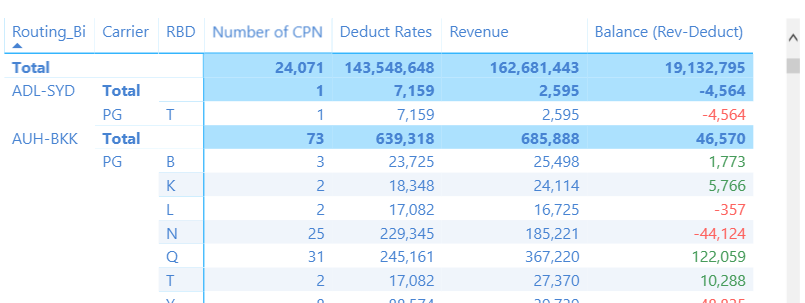
I am using multiple formulas to calculate filed but I found in a Subtotal column is incorrect.
On column: Deduct Rate, I use formula = Amount_THB * Number of CPN. The value in row B, H, V and Y is correct but row Subtotal is incorrect. I want to row Subtotal is calculating = row: B+H+V+Y, please advise me.
Deduct Rates = SUMX('Interline Rate',[Amount_THB])*SUMX(vw_nw_sale_info_01,[Number of CPN])
Thank you.
Solved! Go to Solution.
Hi Ross73312,
This problem is solved.
I have used another way, an insert a new column and use the formula to get data, an example is below.
Deduct Rates = LOOKUPVALUE('Interline Rate'[Amount_THB],
'Interline Rate'[Carrier],vw_nw_sale_info_01[Carrier Uplifted],
'Interline Rate'[Routing_Bi],RELATED('Routing Bi'[Route_Bi]),
'Interline Rate'[RBD],vw_nw_sale_info_01[CLASS]
)% Change Deduct = [Revenue] - [Deduct Rates]
Try:
First create this
Deduct Rates Measure = 'Interline Rate'[Amount_THB] * 'vw_nw_sale_info_01'[Number of CPN]
Now you can use
Deduct Rates = SUMX(
VALUES('Interline Rate'[Routing_BI]),
[Deduct Rates Measure]
)
Hi Ross73312,
Thank you for your reply.
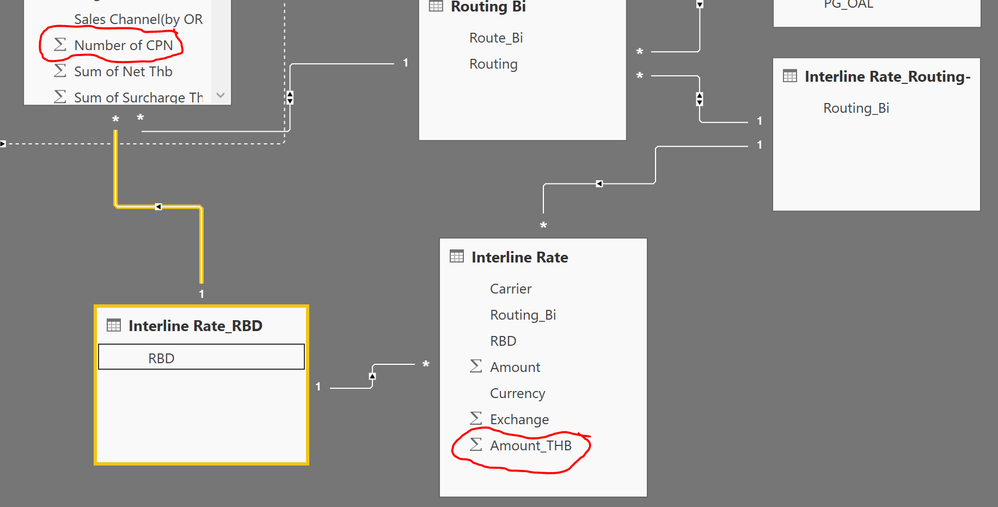
I forget attached relationship of tables.
I cannot relation between 'vw_nw_sale_info_01'[Number of CPN] and 'Interline Rate'[Amount_THB].
That might be the killer part to your problem. You will need to figure out a way to relate the data if you wish to do this. Conceptually, is there anything that relates the two tables?
Hi Ross73312,
This problem is solved.
I have used another way, an insert a new column and use the formula to get data, an example is below.
Deduct Rates = LOOKUPVALUE('Interline Rate'[Amount_THB],
'Interline Rate'[Carrier],vw_nw_sale_info_01[Carrier Uplifted],
'Interline Rate'[Routing_Bi],RELATED('Routing Bi'[Route_Bi]),
'Interline Rate'[RBD],vw_nw_sale_info_01[CLASS]
)% Change Deduct = [Revenue] - [Deduct Rates]
Glad you figured out a path to a solution 🙂
If you have recently started exploring Fabric, we'd love to hear how it's going. Your feedback can help with product improvements.
A new Power BI DataViz World Championship is coming this June! Don't miss out on submitting your entry.
Share feedback directly with Fabric product managers, participate in targeted research studies and influence the Fabric roadmap.
| User | Count |
|---|---|
| 53 | |
| 35 | |
| 31 | |
| 19 | |
| 17 |
| User | Count |
|---|---|
| 75 | |
| 72 | |
| 39 | |
| 35 | |
| 23 |