cancel
Showing results for 
Search instead for 
Did you mean: 

The Power BI Data Visualization World Championships is back! Get ahead of the game and start preparing now! Learn more

Reply
hanami001
Frequent Visitor

Multiply Calculation in Subtotal

Hi Everyone,


I am using multiple formulas to calculate filed but I found in a Subtotal column is incorrect.


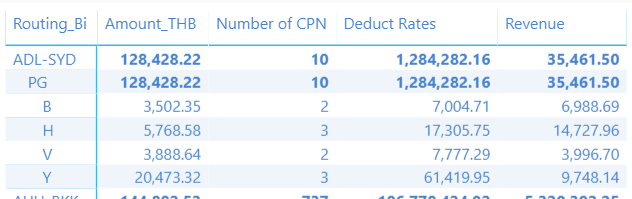
Capture01.PNG


On column: Deduct Rate, I use formula = Amount_THB * Number of CPN. The value in row B, H, V and Y is correct but row Subtotal is incorrect. I want to row Subtotal is calculating = row: B+H+V+Y, please advise me.


Deduct Rates = SUMX('Interline Rate',[Amount_THB])*SUMX(vw_nw_sale_info_01,[Number of CPN])


Thank you.

1 ACCEPTED SOLUTION

Hi Ross73312,


This problem is solved.


I have used another way, an insert a new column and use the formula to get data, an example is below.


Deduct Rates = LOOKUPVALUE('Interline Rate'[Amount_THB],
   'Interline Rate'[Carrier],vw_nw_sale_info_01[Carrier Uplifted],
   'Interline Rate'[Routing_Bi],RELATED('Routing Bi'[Route_Bi]),
   'Interline Rate'[RBD],vw_nw_sale_info_01[CLASS]
)
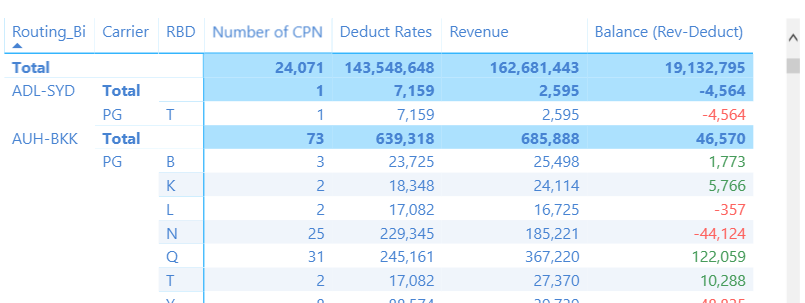
% Change Deduct = [Revenue] - [Deduct Rates]

Capture1111.PNG

View solution in original post

5 REPLIES 5
Anonymous
Not applicable

Try:

First create this

Deduct Rates Measure = 'Interline Rate'[Amount_THB] * 'vw_nw_sale_info_01'[Number of CPN]

Now you can use

Deduct Rates = SUMX(
        VALUES('Interline Rate'[Routing_BI]),
        [Deduct Rates Measure]
)


Hi Ross73312,


Thank you for your reply.


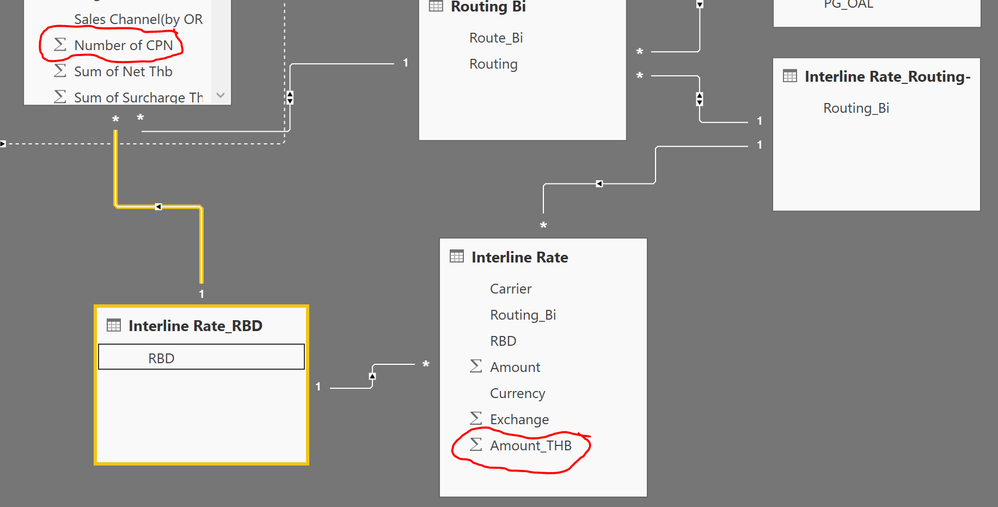
I forget attached relationship of tables.


Capture02.PNG


I cannot relation between 'vw_nw_sale_info_01'[Number of CPN] and 'Interline Rate'[Amount_THB].

Anonymous
Not applicable

That might be the killer part to your problem.  You will need to figure out a way to relate the data if you wish to do this.  Conceptually, is there anything that relates the two tables?

Hi Ross73312,


This problem is solved.


I have used another way, an insert a new column and use the formula to get data, an example is below.


Deduct Rates = LOOKUPVALUE('Interline Rate'[Amount_THB],
   'Interline Rate'[Carrier],vw_nw_sale_info_01[Carrier Uplifted],
   'Interline Rate'[Routing_Bi],RELATED('Routing Bi'[Route_Bi]),
   'Interline Rate'[RBD],vw_nw_sale_info_01[CLASS]
)
% Change Deduct = [Revenue] - [Deduct Rates]

Capture1111.PNG

Anonymous
Not applicable

Glad you figured out a path to a solution 🙂

Helpful resources

Announcements
Power BI DataViz World Championships

Power BI Dataviz World Championships

The Power BI Data Visualization World Championships is back! Get ahead of the game and start preparing now!

November Power BI Update Carousel

Power BI Monthly Update - November 2025

Check out the November 2025 Power BI update to learn about new features.

FabCon Atlanta 2026 carousel

FabCon Atlanta 2026

Join us at FabCon Atlanta, March 16-20, for the ultimate Fabric, Power BI, AI and SQL community-led event. Save $200 with code FABCOMM.