
cancel
Showing results for 
Search instead for 
Did you mean: 

July 28 - August 9 | Final Round of the Power BI Dataviz World Championships. This is your chance. Learn more

Reply
jsentiscr
Regular Visitor

Multiple variables in switch statement


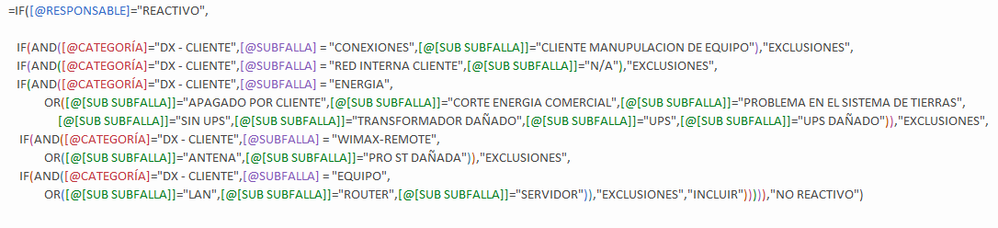
Hello, I have these 2 sentences in Excel and I need to replicate it in Power BI.


Formula 1


F1.PNG


Formula 2


F2.PNG


Maybe someone could guide me.


Thank you.


2 ACCEPTED SOLUTIONS
Greg_Deckler
Community Champion
Community Champion

Most IF statements will translate pretty well between Excel and Power BI because they have the same syntax. Now, your COUNTIF won't because that function doesn't exist, you need to use CALCULATE OR COUNTX.


The other part I anticipate issues is with your AND statements as the DAX versions only accept two arguments versus Excel it is a list. I would suggest using && for AND And || for OR instead.


My suggestion would be to use the SWITCH(TRUE()...) trick like this, I'll start you off:


Formula 1 =

IF([@RESPONSABLE]="REACTIVO",

   SWITCH(TRUE(),

      [@CATEGORIA]="DX - CUENTE" && [@SUBFALLA] = "CONEXIONES" && [@SUB SUBFALLA] = "CUENTE ...","EXCLUSIONES",

      <next true/false>,<next result>

      ...

   )

)


Follow on LinkedIn
@ me in replies or I'll lose your thread!!!
Instead of a Kudo, please vote for this idea
Become an expert!: Enterprise DNA
External Tools: MSHGQM
YouTube Channel!: Microsoft Hates Greg
Latest book!:
DAX For Humans

DAX is easy, CALCULATE makes DAX hard...

View solution in original post


Hi


Excellent contribution, everything worked perfectly.


F1.PNG


View solution in original post

2 REPLIES 2
Greg_Deckler
Community Champion
Community Champion

Most IF statements will translate pretty well between Excel and Power BI because they have the same syntax. Now, your COUNTIF won't because that function doesn't exist, you need to use CALCULATE OR COUNTX.


The other part I anticipate issues is with your AND statements as the DAX versions only accept two arguments versus Excel it is a list. I would suggest using && for AND And || for OR instead.


My suggestion would be to use the SWITCH(TRUE()...) trick like this, I'll start you off:


Formula 1 =

IF([@RESPONSABLE]="REACTIVO",

   SWITCH(TRUE(),

      [@CATEGORIA]="DX - CUENTE" && [@SUBFALLA] = "CONEXIONES" && [@SUB SUBFALLA] = "CUENTE ...","EXCLUSIONES",

      <next true/false>,<next result>

      ...

   )

)


Follow on LinkedIn
@ me in replies or I'll lose your thread!!!
Instead of a Kudo, please vote for this idea
Become an expert!: Enterprise DNA
External Tools: MSHGQM
YouTube Channel!: Microsoft Hates Greg
Latest book!:
DAX For Humans

DAX is easy, CALCULATE makes DAX hard...


Hi


Excellent contribution, everything worked perfectly.


F1.PNG


Helpful resources

Announcements
Fabric Community Sticker Design Challenge Barcelona Carousel

Fabric Community Sticker Challenge - Barcelona 2026

If you love stickers, then you will definitely want to check out our community sticker challenge, Barcelona edition!

July Power BI Update Carousel

Power BI Monthly Update - July 2026

Check out the July 2026 Power BI update to learn about new features.

Power BI DataViz World Championships carousel

Power BI DataViz World Championships - June 2026

A new Power BI DataViz World Championship is coming this June! Don't miss out on submitting your entry.

Top Solution Authors