
Join us at FabCon Atlanta from March 16 - 20, 2026, for the ultimate Fabric, Power BI, AI and SQL community-led event. Save $200 with code FABCOMM.
Register now!Vote for your favorite vizzies from the Power BI Dataviz World Championship submissions. Vote now!
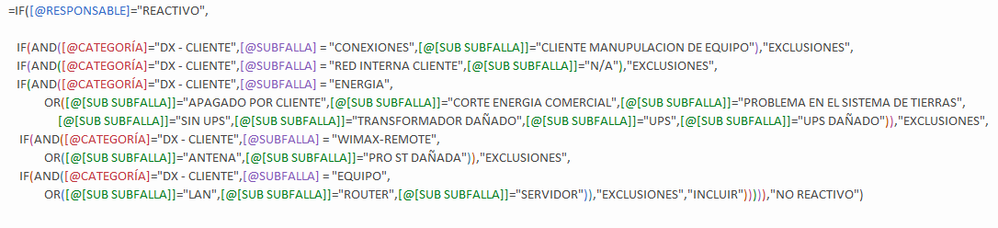
Hello, I have these 2 sentences in Excel and I need to replicate it in Power BI.
Formula 1
Formula 2
Maybe someone could guide me.
Thank you.
Solved! Go to Solution.
Most IF statements will translate pretty well between Excel and Power BI because they have the same syntax. Now, your COUNTIF won't because that function doesn't exist, you need to use CALCULATE OR COUNTX.
The other part I anticipate issues is with your AND statements as the DAX versions only accept two arguments versus Excel it is a list. I would suggest using && for AND And || for OR instead.
My suggestion would be to use the SWITCH(TRUE()...) trick like this, I'll start you off:
Formula 1 =
IF([@RESPONSABLE]="REACTIVO",
SWITCH(TRUE(),
[@CATEGORIA]="DX - CUENTE" && [@SUBFALLA] = "CONEXIONES" && [@SUB SUBFALLA] = "CUENTE ...","EXCLUSIONES",
<next true/false>,<next result>
...
)
)
Most IF statements will translate pretty well between Excel and Power BI because they have the same syntax. Now, your COUNTIF won't because that function doesn't exist, you need to use CALCULATE OR COUNTX.
The other part I anticipate issues is with your AND statements as the DAX versions only accept two arguments versus Excel it is a list. I would suggest using && for AND And || for OR instead.
My suggestion would be to use the SWITCH(TRUE()...) trick like this, I'll start you off:
Formula 1 =
IF([@RESPONSABLE]="REACTIVO",
SWITCH(TRUE(),
[@CATEGORIA]="DX - CUENTE" && [@SUBFALLA] = "CONEXIONES" && [@SUB SUBFALLA] = "CUENTE ...","EXCLUSIONES",
<next true/false>,<next result>
...
)
)
Hi
Excellent contribution, everything worked perfectly.
Vote for your favorite vizzies from the Power BI World Championship submissions!
If you love stickers, then you will definitely want to check out our Community Sticker Challenge!
Check out the January 2026 Power BI update to learn about new features.
| User | Count |
|---|---|
| 57 | |
| 52 | |
| 40 | |
| 17 | |
| 16 |
| User | Count |
|---|---|
| 112 | |
| 108 | |
| 39 | |
| 34 | |
| 27 |