cancel
Showing results for 
Search instead for 
Did you mean: 

July 7 - July 17 | Round 2 of the Power BI Dataviz World Championships. Don't miss your chance! Learn more

Reply
gmiro
Regular Visitor

Multiple rows with different atributes into multiple columns

Hi all,
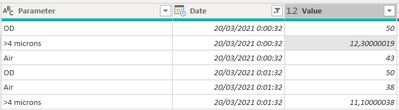
I have a data stream with multiple rows with different parameters for the same timestamp:

gmiro_1-1618222108180.png


I'd like to transform it into a unique table with columns as parameters for the same timestamp.

gmiro_2-1618222121961.png


I've been looking for the different examples for multiple rows combination but no luck. Thanks!

2 ACCEPTED SOLUTIONS
Jihwan_Kim
Super User
Super User

Hi, @gmiro 

Please try the below in Power Query Editor.


- select Parameter Column

- click Pivot Column

- select Value as Value-Column

- Click


Hi, My name is Jihwan Kim.

If this post helps, then please consider accept it as the solution to help other members find it faster, and give a big thumbs up.

OK


If this post helps, then please consider accepting it as the solution to help other members find it faster, and give a big thumbs up.


Click here to visit my LinkedIn page

View solution in original post

Hi, @gmiro 

Thank you for your feedback.

It worked fine on my Power Query Editor.

If it is OK with you, please share your sample pbix file, then I can try to look into it.


Thank you.


Hi, My name is Jihwan Kim.

If this post helps, then please consider accept it as the solution to help other members find it faster, and give a big thumbs up.


If this post helps, then please consider accepting it as the solution to help other members find it faster, and give a big thumbs up.


Click here to visit my LinkedIn page

View solution in original post

4 REPLIES 4
Jihwan_Kim
Super User
Super User

Hi, @gmiro 

Please try the below in Power Query Editor.


- select Parameter Column

- click Pivot Column

- select Value as Value-Column

- Click


Hi, My name is Jihwan Kim.

If this post helps, then please consider accept it as the solution to help other members find it faster, and give a big thumbs up.

OK


If this post helps, then please consider accepting it as the solution to help other members find it faster, and give a big thumbs up.


Click here to visit my LinkedIn page

Hi Mr Kim @Jihwan_Kim 

It gives me an error: DataFormat.Error: The input provided as a DateTime value could not be parsed. Details: 20.

I've also tested with datetime as a text with no luck.

Hi, @gmiro 

Thank you for your feedback.

It worked fine on my Power Query Editor.

If it is OK with you, please share your sample pbix file, then I can try to look into it.


Thank you.


Hi, My name is Jihwan Kim.

If this post helps, then please consider accept it as the solution to help other members find it faster, and give a big thumbs up.


If this post helps, then please consider accepting it as the solution to help other members find it faster, and give a big thumbs up.


Click here to visit my LinkedIn page

Hi Mr Kim @Jihwan_Kim 


I've started from scratch and it worked thanks!

Helpful resources

Announcements
FabCon and SQLCon Barcelona 2026

FabCon & SQLCon – Barcelona 2026

Join us in Barcelona for FabCon and SQLCon, the Fabric, Power BI, SQL, and AI community event. Save €200 with code FABCMTY200.

60 days of Data Days Carousel

Data Days 2026

Join Fabric Data Days 2026: 60 days of free live/on-demand sessions, challenges, study groups, and certification opportunities.

Power BI DataViz World Championships carousel

Power BI DataViz World Championships - June 2026

A new Power BI DataViz World Championship is coming this June! Don't miss out on submitting your entry.