Join us at FabCon Atlanta from March 16 - 20, 2026, for the ultimate Fabric, Power BI, AI and SQL community-led event. Save $200 with code FABCOMM.
Register now!The Power BI Data Visualization World Championships is back! Get ahead of the game and start preparing now! Learn more
Hi Team,
Greetings!
I have a requirement to get multiple row headers in matrix visual in Power BI. Lets say, I have a table as below :
| Brand | FiscalPeriod | Measure1 | Measure2 |
| A | P1 | 100 | 200 |
| B | P2 | 110 | 210 |
| C | P3 | 120 | 220 |
| D | P4 | 130 | 230 |
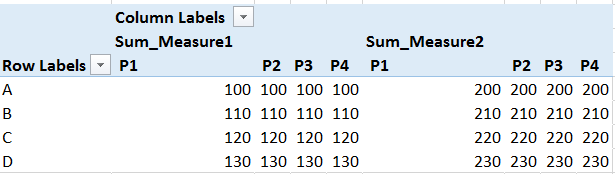
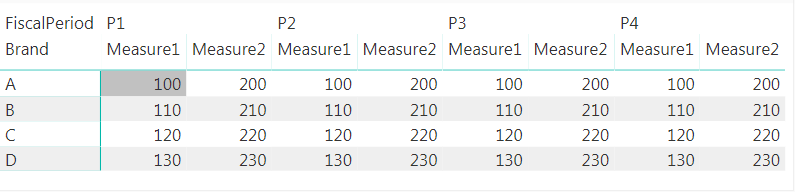
I would like to have a report as below.
As_Required
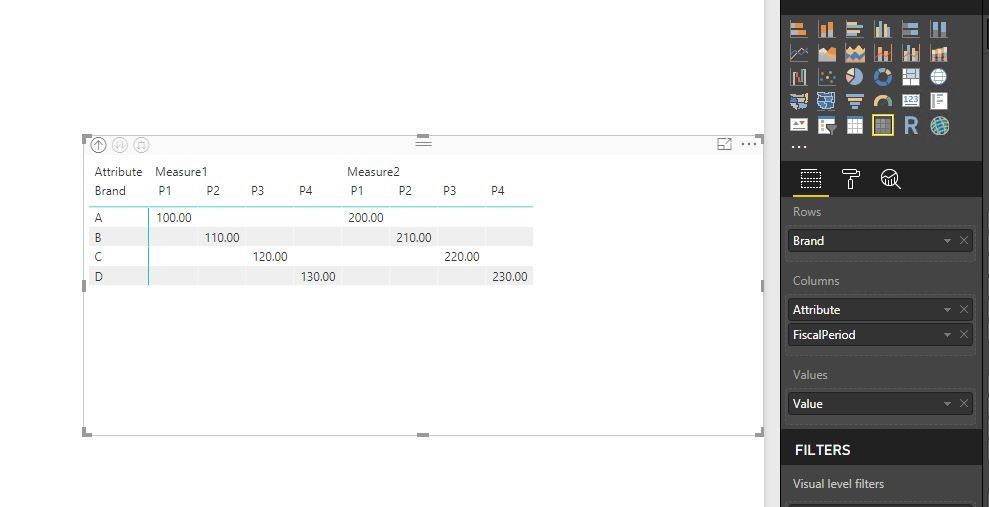
Asofnow_acheived_PowerBI
But in the matrix visual, if I add two metrics, for a single fiscal period, the metrics are split. whereas under single metric, the time periods have to be split. Similarly I have more measures in this case. Kindly suggest if you have any ideas to this challenge.
Thanks in advance,
Arunsundar M
Solved! Go to Solution.
@Arunsundar,
If Measure1 and Measure2 are two columns in your table, you can first unpivot columns in the table, then create Matrix visual.
Regards,
Lydia
@Arunsundar,
If Measure1 and Measure2 are two columns in your table, you can first unpivot columns in the table, then create Matrix visual.
Regards,
Lydia
Hi @Anonymous ,
If my measures are not columns how could I get the desired matrix?
Thank you in advance,
Eleftheria
Hi Lydia,
It worked. Thats cool.
Thanks,
Arunsundar M
The Power BI Data Visualization World Championships is back! Get ahead of the game and start preparing now!
| User | Count |
|---|---|
| 61 | |
| 46 | |
| 40 | |
| 38 | |
| 22 |
| User | Count |
|---|---|
| 176 | |
| 131 | |
| 118 | |
| 82 | |
| 54 |