Join us at FabCon Atlanta from March 16 - 20, 2026, for the ultimate Fabric, Power BI, AI and SQL community-led event. Save $200 with code FABCOMM.
Register now!Vote for your favorite vizzies from the Power BI Dataviz World Championship submissions. Vote now!
Hi Team,
Greetings!
I have a requirement to get multiple row headers in matrix visual in Power BI. Lets say, I have a table as below :
| Brand | FiscalPeriod | Measure1 | Measure2 |
| A | P1 | 100 | 200 |
| B | P2 | 110 | 210 |
| C | P3 | 120 | 220 |
| D | P4 | 130 | 230 |
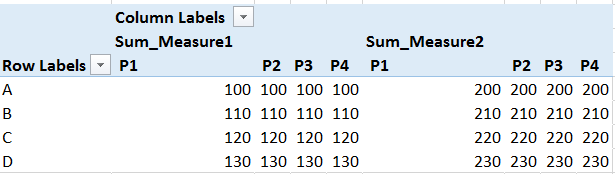
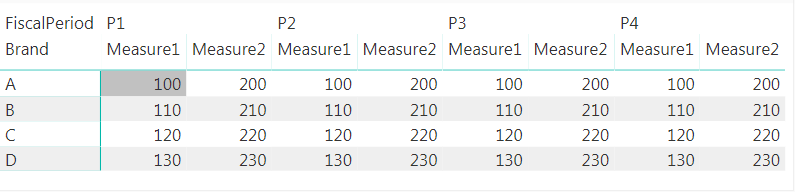
I would like to have a report as below.
As_Required
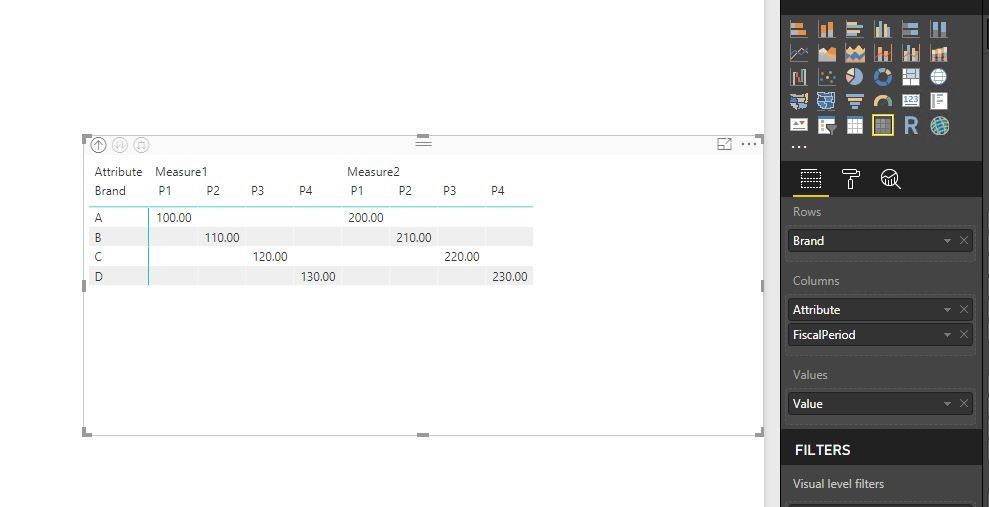
Asofnow_acheived_PowerBI
But in the matrix visual, if I add two metrics, for a single fiscal period, the metrics are split. whereas under single metric, the time periods have to be split. Similarly I have more measures in this case. Kindly suggest if you have any ideas to this challenge.
Thanks in advance,
Arunsundar M
Solved! Go to Solution.
@Arunsundar,
If Measure1 and Measure2 are two columns in your table, you can first unpivot columns in the table, then create Matrix visual.
Regards,
Lydia
@Arunsundar,
If Measure1 and Measure2 are two columns in your table, you can first unpivot columns in the table, then create Matrix visual.
Regards,
Lydia
Hi @Anonymous ,
If my measures are not columns how could I get the desired matrix?
Thank you in advance,
Eleftheria
Hi Lydia,
It worked. Thats cool.
Thanks,
Arunsundar M
Vote for your favorite vizzies from the Power BI World Championship submissions!
If you love stickers, then you will definitely want to check out our Community Sticker Challenge!
Check out the January 2026 Power BI update to learn about new features.
| User | Count |
|---|---|
| 64 | |
| 53 | |
| 42 | |
| 20 | |
| 17 |
| User | Count |
|---|---|
| 121 | |
| 103 | |
| 46 | |
| 30 | |
| 24 |