This time we’re going bigger than ever. Fabric, Power BI, SQL, AI and more. We're covering it all. You won't want to miss it.
Learn moreLevel up your Power BI skills this month - build one visual each week and tell better stories with data! Get started
Hi Team,
Greetings!
I have a requirement to get multiple row headers in matrix visual in Power BI. Lets say, I have a table as below :
| Brand | FiscalPeriod | Measure1 | Measure2 |
| A | P1 | 100 | 200 |
| B | P2 | 110 | 210 |
| C | P3 | 120 | 220 |
| D | P4 | 130 | 230 |
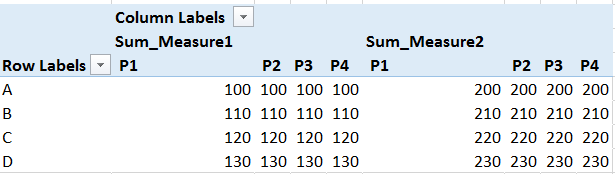
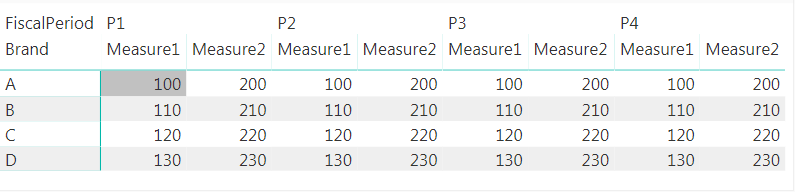
I would like to have a report as below.
As_Required
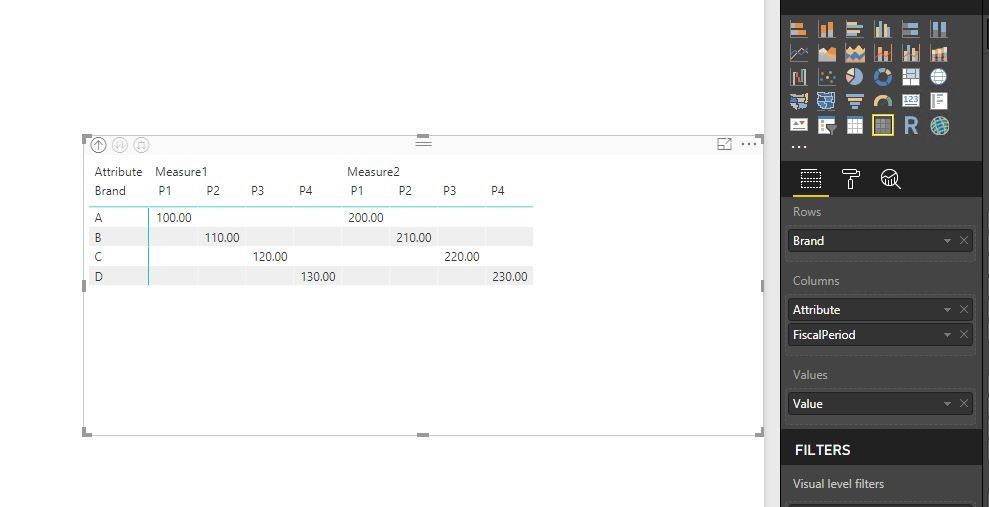
Asofnow_acheived_PowerBI
But in the matrix visual, if I add two metrics, for a single fiscal period, the metrics are split. whereas under single metric, the time periods have to be split. Similarly I have more measures in this case. Kindly suggest if you have any ideas to this challenge.
Thanks in advance,
Arunsundar M
Solved! Go to Solution.
@Arunsundar,
If Measure1 and Measure2 are two columns in your table, you can first unpivot columns in the table, then create Matrix visual.
Regards,
Lydia
@Arunsundar,
If Measure1 and Measure2 are two columns in your table, you can first unpivot columns in the table, then create Matrix visual.
Regards,
Lydia
Hi @Anonymous ,
If my measures are not columns how could I get the desired matrix?
Thank you in advance,
Eleftheria
Hi Lydia,
It worked. Thats cool.
Thanks,
Arunsundar M
Check out the April 2026 Power BI update to learn about new features.
Sign up to receive a private message when registration opens and key events begin.
If you have recently started exploring Fabric, we'd love to hear how it's going. Your feedback can help with product improvements.
| User | Count |
|---|---|
| 28 | |
| 23 | |
| 22 | |
| 16 | |
| 16 |
| User | Count |
|---|---|
| 61 | |
| 35 | |
| 28 | |
| 22 | |
| 22 |