cancel
Showing results for 
Search instead for 
Did you mean: 

The Power BI Data Visualization World Championships is back! Get ahead of the game and start preparing now! Learn more

Reply
Anonymous
Not applicable

Multiple hyperlinks

Hi

I'm putting together a returns book so that I can have access to customer descriptions about the reasons that made them ask for the return of some products from the store where I work. My question is if I can be directed to page 2 (with customer descriptions by returned product) every time I click on the product I want to check. It is possible?


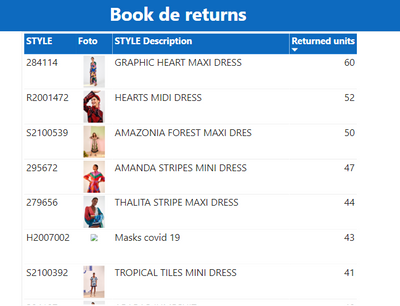
Page 1:

israelgxx_0-1626109130436.png


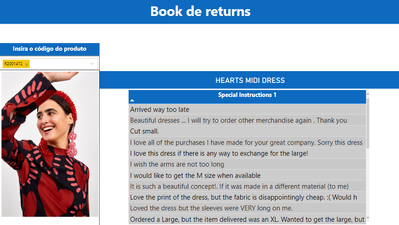
Page 2: 

israelgxx_1-1626109189861.png


1 ACCEPTED SOLUTION
Anonymous
Not applicable

Hi @Anonymous ,


You could use drillthrough feature.

https://docs.microsoft.com/en-us/power-bi/create-reports/desktop-drillthrough 


Best Regards,

Jay

View solution in original post

2 REPLIES 2
Anonymous
Not applicable

Hi @Anonymous ,


You could use drillthrough feature.

https://docs.microsoft.com/en-us/power-bi/create-reports/desktop-drillthrough 


Best Regards,

Jay

Anonymous
Not applicable

If I can make the filter on page 2 automatically receive the product code that the person clicked on on page 1, that would also solve my problem.

Helpful resources

Announcements
Power BI DataViz World Championships

Power BI Dataviz World Championships

The Power BI Data Visualization World Championships is back! Get ahead of the game and start preparing now!

December 2025 Power BI Update Carousel

Power BI Monthly Update - December 2025

Check out the December 2025 Power BI Holiday Recap!

FabCon Atlanta 2026 carousel

FabCon Atlanta 2026

Join us at FabCon Atlanta, March 16-20, for the ultimate Fabric, Power BI, AI and SQL community-led event. Save $200 with code FABCOMM.