Don't miss your chance to take the Fabric Data Engineer (DP-600) exam for FREE! Find out how by attending the DP-600 session on April 23rd (pacific time), live or on-demand.
Learn moreNext up in the FabCon + SQLCon recap series: The roadmap for Microsoft SQL and Maximizing Developer experiences in Fabric. All sessions are available on-demand after the live show. Register now
Hi I have two talbes Jobs and Dates with the date as the relationship. I wish to count the individual people (name) to see how many jobs they have completed (job status) for the month on in one column and a seperate column for the the week.
thank you
| Job Table | >>>>>>>>> | Dates Table | |||||||||||
| Name | Job Status | Job Reference Number | Date | Date | Year | Month | Week | ||||||
| Jim | Completed | 23254 | 01/07/2019 | 01/08/2019 | 2019 | July | 14 | ||||||
| Jim | Completed | 454545 | 02/07/2019 | 02/08/2019 | 2019 | July | 14 | ||||||
| Jim | Completed | 54545 | 03/07/2019 | 03/08/2019 | 2019 | July | 14 | ||||||
| Jim | Completed | 54545 | 04/07/2019 |
| 04/08/2019 | 2019 | July | 14 | |||||
| Jim | Completed | 445454 | 05/07/2019 | 05/08/2019 | 2019 | July | 14 | ||||||
| Bob | Completed | 836363 | 06/07/2019 | 06/08/2019 | 2019 | July | 14 | ||||||
| Bob | Completed | 1227272 | 07/07/2019 | 07/08/2019 | 2019 | July | 14 | ||||||
| Bob | Completed | 1618181 | 08/07/2019 | 08/08/2019 | 2019 | July | 15 | ||||||
| Bob | Completed | 2009090 | 09/07/2019 | 09/08/2019 | 2019 | July | 15 | ||||||
| Gary | Completed | 2399999 | 10/07/2019 | 10/08/2019 | 2019 | July | 15 | ||||||
| Gary | Completed | 2790908 | 11/07/2019 | 11/08/2019 | 2019 | July | 15 |
Solved! Go to Solution.
Hi @cottrera
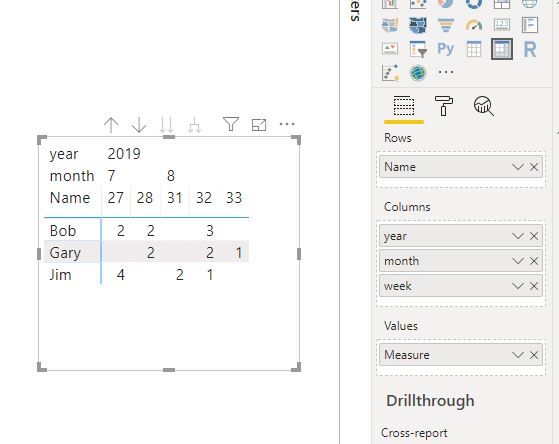
Create measures as below
And add columns from calendar table in a matrix visual
Measure =
CALCULATE (
DISTINCTCOUNT ( Sheet2[Job Reference Number] ),
FILTER (
Sheet2,
Sheet2[Name] = MAX ( Sheet2[Name] )
&& Sheet2[Job Status] = "Completed"
)
)
Hi @cottrera
Create measures as below
And add columns from calendar table in a matrix visual
Measure =
CALCULATE (
DISTINCTCOUNT ( Sheet2[Job Reference Number] ),
FILTER (
Sheet2,
Sheet2[Name] = MAX ( Sheet2[Name] )
&& Sheet2[Job Status] = "Completed"
)
)
If you have recently started exploring Fabric, we'd love to hear how it's going. Your feedback can help with product improvements.
A new Power BI DataViz World Championship is coming this June! Don't miss out on submitting your entry.
Experience the highlights from FabCon & SQLCon, available live and on-demand starting April 14th.
| User | Count |
|---|---|
| 48 | |
| 40 | |
| 37 | |
| 20 | |
| 16 |
| User | Count |
|---|---|
| 70 | |
| 67 | |
| 32 | |
| 27 | |
| 25 |