cancel
Showing results for 
Search instead for 
Did you mean: 

Next up in the FabCon + SQLCon recap series: The roadmap for Microsoft SQL and Maximizing Developer experiences in Fabric. All sessions are available on-demand after the live show. Register now

Reply
cottrera
Post Prodigy
Post Prodigy

Multiple count

 Hi I have two talbes Jobs and Dates with the date as the relationship. I wish to count the individual people (name) to see how many jobs they have completed  (job status) for the month on in one column  and a seperate column for the the week.


thank you


Job Table>>>>>>>>>Dates Table
NameJob StatusJob Reference NumberDate DateYearMonthWeek
JimCompleted2325401/07/2019 01/08/20192019July14
JimCompleted45454502/07/2019 02/08/20192019July14
JimCompleted5454503/07/2019 03/08/20192019July14
JimCompleted5454504/07/2019
 
>>>>>>>>
 
04/08/20192019July14
JimCompleted44545405/07/201905/08/20192019July14
BobCompleted83636306/07/201906/08/20192019July14
BobCompleted122727207/07/2019 07/08/20192019July14
BobCompleted161818108/07/2019 08/08/20192019July15
BobCompleted200909009/07/2019 09/08/20192019July15
GaryCompleted239999910/07/2019 10/08/20192019July15
GaryCompleted279090811/07/2019 11/08/20192019July15
1 ACCEPTED SOLUTION
v-juanli-msft
Community Support
Community Support

Hi @cottrera 

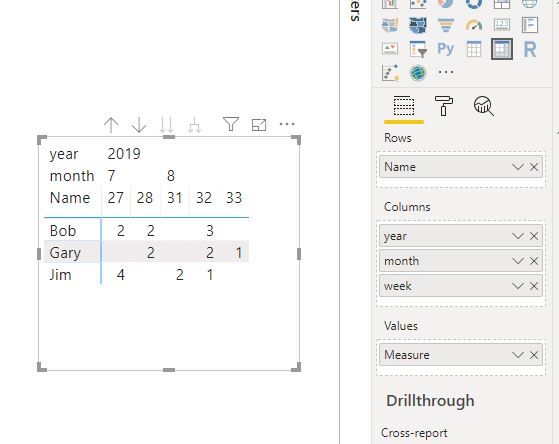
Create measures as below

And add columns from calendar table in a matrix visual

Measure =
CALCULATE (
    DISTINCTCOUNT ( Sheet2[Job Reference Number] ),
    FILTER (
        Sheet2,
        Sheet2[Name] = MAX ( Sheet2[Name] )
            && Sheet2[Job Status] = "Completed"
    )
)

Capture3.JPGCapture4.JPG

Best Regards
Maggie
Community Support Team _ Maggie Li
If this post helps, then please consider Accept it as the solution to help the other members find it more quickly.

View solution in original post

1 REPLY 1
v-juanli-msft
Community Support
Community Support

Hi @cottrera 

Create measures as below

And add columns from calendar table in a matrix visual

Measure =
CALCULATE (
    DISTINCTCOUNT ( Sheet2[Job Reference Number] ),
    FILTER (
        Sheet2,
        Sheet2[Name] = MAX ( Sheet2[Name] )
            && Sheet2[Job Status] = "Completed"
    )
)

Capture3.JPGCapture4.JPG

Best Regards
Maggie
Community Support Team _ Maggie Li
If this post helps, then please consider Accept it as the solution to help the other members find it more quickly.

Helpful resources

Announcements
New to Fabric survey Carousel

New to Fabric Survey

If you have recently started exploring Fabric, we'd love to hear how it's going. Your feedback can help with product improvements.

Power BI DataViz World Championships carousel

Power BI DataViz World Championships - June 2026

A new Power BI DataViz World Championship is coming this June! Don't miss out on submitting your entry.

Join our Fabric User Panel

Join our Fabric User Panel

Share feedback directly with Fabric product managers, participate in targeted research studies and influence the Fabric roadmap.

March Power BI Update Carousel

Power BI Community Update - March 2026

Check out the March 2026 Power BI update to learn about new features.