Join us at FabCon Atlanta from March 16 - 20, 2026, for the ultimate Fabric, Power BI, AI and SQL community-led event. Save $200 with code FABCOMM.
Register now!The Power BI Data Visualization World Championships is back! Get ahead of the game and start preparing now! Learn more
Hi
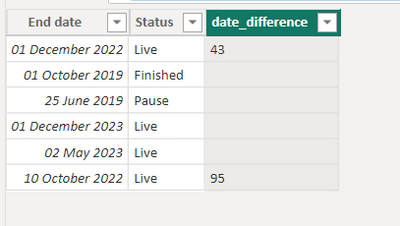
I want to create the below table. I have created the date difference column but only want a number to appear under certain conditions. -
| End date | Status | Date difference |
| 01/12/2022 | Live | 43 |
| 01/10/2019 | Finished | |
| 25/06/2019 | Pause | |
| 01/12/2023 | Live | |
| 02/05/2023 | Live | |
| 10/10/2022 | Live | 95 |
I want the below to be blank -
Passed end date and pause = blank
Passed end date and finished = blank
Not passed end date = blank
Else show the date difference if Live and passed end date
hope that makes sense, any help is greatly appreciated
thanks
Solved! Go to Solution.
Hi,
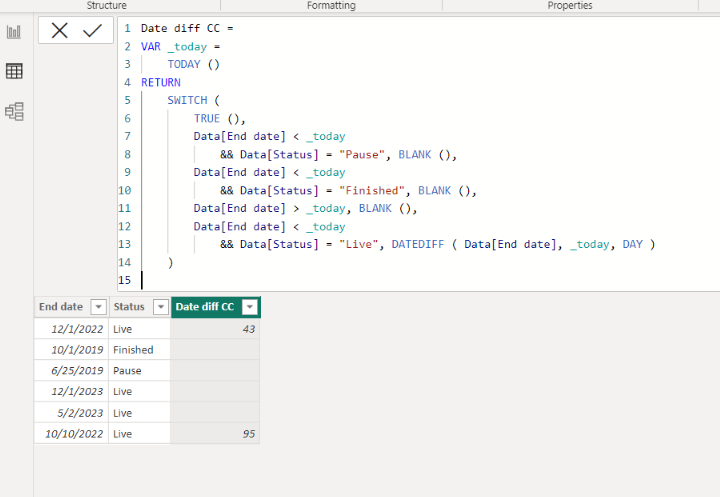
Please check the below picture and the attached pbix file.
It is for creating a new column.
Date diff CC =
VAR _today =
TODAY ()
RETURN
SWITCH (
TRUE (),
Data[End date] < _today
&& Data[Status] = "Pause", BLANK (),
Data[End date] < _today
&& Data[Status] = "Finished", BLANK (),
Data[End date] > _today, BLANK (),
Data[End date] < _today
&& Data[Status] = "Live", DATEDIFF ( Data[End date], _today, DAY )
)
@WJ876400 you can create a calc column like below.
have attached pbix file as well.
Proud to be a Super User!
Hi,
Please check the below picture and the attached pbix file.
It is for creating a new column.
Date diff CC =
VAR _today =
TODAY ()
RETURN
SWITCH (
TRUE (),
Data[End date] < _today
&& Data[Status] = "Pause", BLANK (),
Data[End date] < _today
&& Data[Status] = "Finished", BLANK (),
Data[End date] > _today, BLANK (),
Data[End date] < _today
&& Data[Status] = "Live", DATEDIFF ( Data[End date], _today, DAY )
)
The Power BI Data Visualization World Championships is back! Get ahead of the game and start preparing now!
| User | Count |
|---|---|
| 161 | |
| 132 | |
| 117 | |
| 79 | |
| 54 |