cancel
Showing results for 
Search instead for 
Did you mean: 

Join the FabCon + SQLCon recap series. Up next: Power BI, Real-Time Intelligence, IQ and AI, and Data Factory take center stage. All sessions are available on-demand after the live show. Register now

Reply
WJ876400
Helper IV
Helper IV

Multiple If statement

Hi


I want to create the below table. I have created the date difference column but only want a number to appear under certain conditions. -


End dateStatusDate difference
01/12/2022Live43
01/10/2019Finished 
25/06/2019Pause 
01/12/2023Live 
02/05/2023Live 
10/10/2022Live95


I want the below to be blank -


Passed end date and pause = blank

Passed end date and finished = blank

Not passed end date = blank


Else show the date difference if Live and passed end date


hope that makes sense, any help is greatly appreciated


thanks

1 ACCEPTED SOLUTION
Jihwan_Kim
Super User
Super User

Hi,

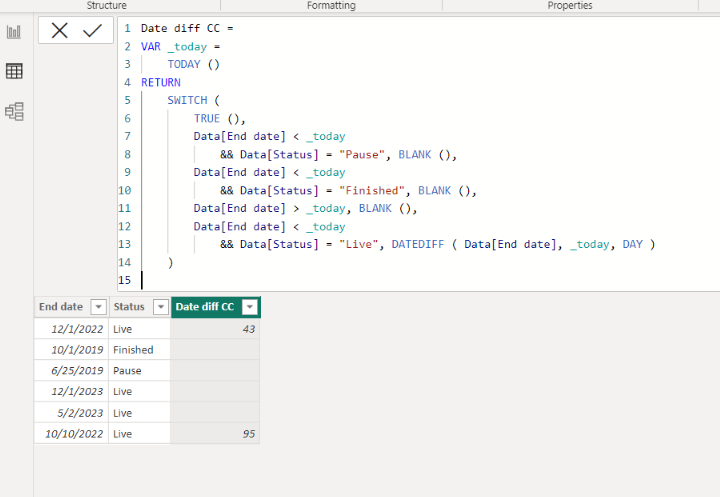
Please check the below picture and the attached pbix file.

It is for creating a new column.


Jihwan_Kim_0-1673613474361.png


Date diff CC =
VAR _today =
    TODAY ()
RETURN
    SWITCH (
        TRUE (),
        Data[End date] < _today
            && Data[Status] = "Pause", BLANK (),
        Data[End date] < _today
            && Data[Status] = "Finished", BLANK (),
        Data[End date] > _today, BLANK (),
        Data[End date] < _today
            && Data[Status] = "Live", DATEDIFF ( Data[End date], _today, DAY )
    )

If this post helps, then please consider accepting it as the solution to help other members find it faster, and give a big thumbs up.


Click here to visit my LinkedIn page

View solution in original post

2 REPLIES 2
negi007
Community Champion
Community Champion

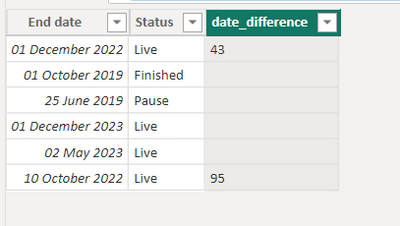
@WJ876400  you can create a calc column like below. 


date_difference =
var _todayDate = TODAY()
var _endDate = 'Table'[End date]
var _variance = if (_endDate < _todayDate && 'Table'[Status] = "Pause" ,"",
                if (_endDate < _todayDate && 'Table'[Status] = "finished", "" ,
                     if (_endDate >_todayDate , "" ,
                         if (_endDate <_todayDate  && 'Table'[Status] = "live" , _todayDate-_endDate ,""))))
return
if (ISNUMBER(_variance),FORMAT(_variance,"General Number"),"")
 
negi007_0-1673613720992.png

have attached pbix file as well.


Did I answer your question? Mark my post as a solution!
Appreciate your Kudos


Proud to be a Super User!


Follow me on linkedin

Jihwan_Kim
Super User
Super User

Hi,

Please check the below picture and the attached pbix file.

It is for creating a new column.


Jihwan_Kim_0-1673613474361.png


Date diff CC =
VAR _today =
    TODAY ()
RETURN
    SWITCH (
        TRUE (),
        Data[End date] < _today
            && Data[Status] = "Pause", BLANK (),
        Data[End date] < _today
            && Data[Status] = "Finished", BLANK (),
        Data[End date] > _today, BLANK (),
        Data[End date] < _today
            && Data[Status] = "Live", DATEDIFF ( Data[End date], _today, DAY )
    )

If this post helps, then please consider accepting it as the solution to help other members find it faster, and give a big thumbs up.


Click here to visit my LinkedIn page

Helpful resources

Announcements
April Power BI Update Carousel

Power BI Monthly Update - April 2026

Check out the April 2026 Power BI update to learn about new features.

New to Fabric survey Carousel

New to Fabric Survey

If you have recently started exploring Fabric, we'd love to hear how it's going. Your feedback can help with product improvements.

Power BI DataViz World Championships carousel

Power BI DataViz World Championships - June 2026

A new Power BI DataViz World Championship is coming this June! Don't miss out on submitting your entry.

FabCon and SQLCon Highlights Carousel

FabCon &SQLCon Highlights

Experience the highlights from FabCon & SQLCon, available live and on-demand starting April 14th.