Share feedback directly with Fabric product managers, participate in targeted research studies and influence the Fabric roadmap.
Sign up nowGet Fabric certified for FREE! Don't miss your chance! Learn more
Hi
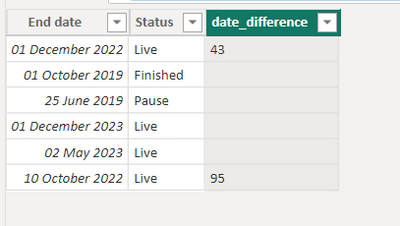
I want to create the below table. I have created the date difference column but only want a number to appear under certain conditions. -
| End date | Status | Date difference |
| 01/12/2022 | Live | 43 |
| 01/10/2019 | Finished | |
| 25/06/2019 | Pause | |
| 01/12/2023 | Live | |
| 02/05/2023 | Live | |
| 10/10/2022 | Live | 95 |
I want the below to be blank -
Passed end date and pause = blank
Passed end date and finished = blank
Not passed end date = blank
Else show the date difference if Live and passed end date
hope that makes sense, any help is greatly appreciated
thanks
Solved! Go to Solution.
Hi,
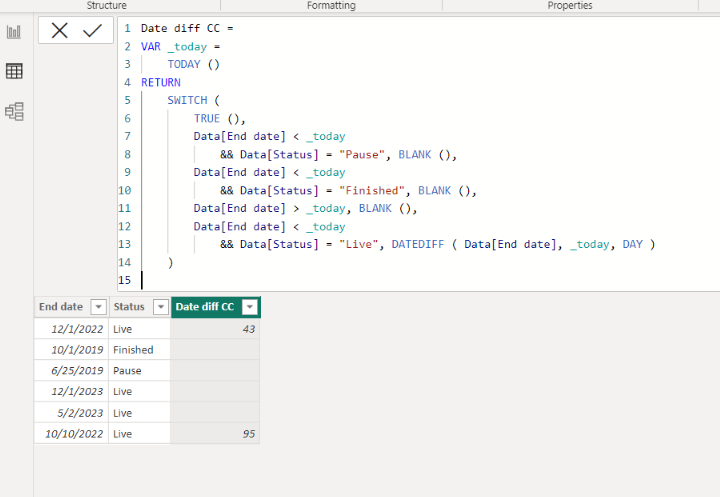
Please check the below picture and the attached pbix file.
It is for creating a new column.
Date diff CC =
VAR _today =
TODAY ()
RETURN
SWITCH (
TRUE (),
Data[End date] < _today
&& Data[Status] = "Pause", BLANK (),
Data[End date] < _today
&& Data[Status] = "Finished", BLANK (),
Data[End date] > _today, BLANK (),
Data[End date] < _today
&& Data[Status] = "Live", DATEDIFF ( Data[End date], _today, DAY )
)
@WJ876400 you can create a calc column like below.
have attached pbix file as well.
Proud to be a Super User!
Hi,
Please check the below picture and the attached pbix file.
It is for creating a new column.
Date diff CC =
VAR _today =
TODAY ()
RETURN
SWITCH (
TRUE (),
Data[End date] < _today
&& Data[Status] = "Pause", BLANK (),
Data[End date] < _today
&& Data[Status] = "Finished", BLANK (),
Data[End date] > _today, BLANK (),
Data[End date] < _today
&& Data[Status] = "Live", DATEDIFF ( Data[End date], _today, DAY )
)
Share feedback directly with Fabric product managers, participate in targeted research studies and influence the Fabric roadmap.
| User | Count |
|---|---|
| 57 | |
| 53 | |
| 42 | |
| 18 | |
| 14 |
| User | Count |
|---|---|
| 111 | |
| 104 | |
| 36 | |
| 28 | |
| 27 |