cancel
Showing results for 
Search instead for 
Did you mean: 

The Power BI Data Visualization World Championships is back! It's time to submit your entry. Live now!

Reply
WJ876400
Helper IV
Helper IV

Multiple If statement

Hi


I want to create the below table. I have created the date difference column but only want a number to appear under certain conditions. -


End dateStatusDate difference
01/12/2022Live43
01/10/2019Finished 
25/06/2019Pause 
01/12/2023Live 
02/05/2023Live 
10/10/2022Live95


I want the below to be blank -


Passed end date and pause = blank

Passed end date and finished = blank

Not passed end date = blank


Else show the date difference if Live and passed end date


hope that makes sense, any help is greatly appreciated


thanks

1 ACCEPTED SOLUTION
Jihwan_Kim
Super User
Super User

Hi,

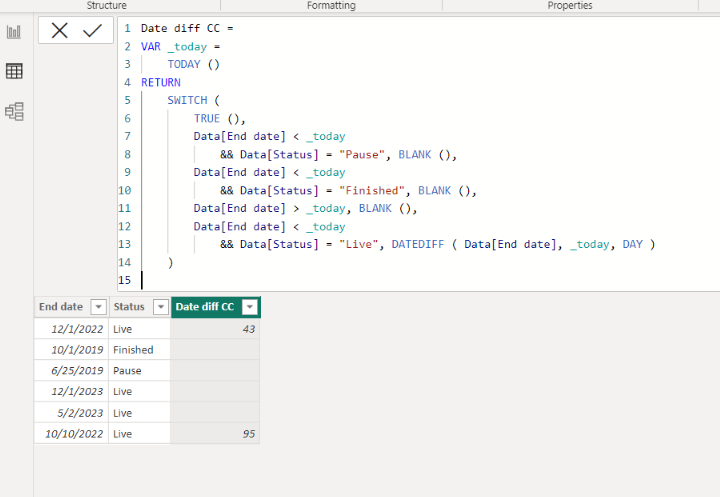
Please check the below picture and the attached pbix file.

It is for creating a new column.


Jihwan_Kim_0-1673613474361.png


Date diff CC =
VAR _today =
    TODAY ()
RETURN
    SWITCH (
        TRUE (),
        Data[End date] < _today
            && Data[Status] = "Pause", BLANK (),
        Data[End date] < _today
            && Data[Status] = "Finished", BLANK (),
        Data[End date] > _today, BLANK (),
        Data[End date] < _today
            && Data[Status] = "Live", DATEDIFF ( Data[End date], _today, DAY )
    )

If this post helps, then please consider accepting it as the solution to help other members find it faster, and give a big thumbs up.


Click here to visit my LinkedIn page

View solution in original post

2 REPLIES 2
negi007
Community Champion
Community Champion

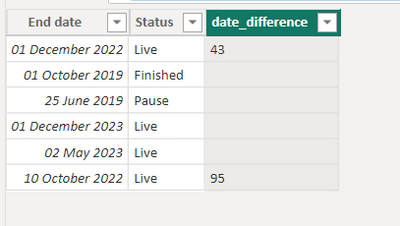
@WJ876400  you can create a calc column like below. 


date_difference =
var _todayDate = TODAY()
var _endDate = 'Table'[End date]
var _variance = if (_endDate < _todayDate && 'Table'[Status] = "Pause" ,"",
                if (_endDate < _todayDate && 'Table'[Status] = "finished", "" ,
                     if (_endDate >_todayDate , "" ,
                         if (_endDate <_todayDate  && 'Table'[Status] = "live" , _todayDate-_endDate ,""))))
return
if (ISNUMBER(_variance),FORMAT(_variance,"General Number"),"")
 
negi007_0-1673613720992.png

have attached pbix file as well.


Did I answer your question? Mark my post as a solution!
Appreciate your Kudos


Proud to be a Super User!


Follow me on linkedin

Jihwan_Kim
Super User
Super User

Hi,

Please check the below picture and the attached pbix file.

It is for creating a new column.


Jihwan_Kim_0-1673613474361.png


Date diff CC =
VAR _today =
    TODAY ()
RETURN
    SWITCH (
        TRUE (),
        Data[End date] < _today
            && Data[Status] = "Pause", BLANK (),
        Data[End date] < _today
            && Data[Status] = "Finished", BLANK (),
        Data[End date] > _today, BLANK (),
        Data[End date] < _today
            && Data[Status] = "Live", DATEDIFF ( Data[End date], _today, DAY )
    )

If this post helps, then please consider accepting it as the solution to help other members find it faster, and give a big thumbs up.


Click here to visit my LinkedIn page

Helpful resources

Announcements
December 2025 Power BI Update Carousel

Power BI Monthly Update - December 2025

Check out the December 2025 Power BI Holiday Recap!

FabCon Atlanta 2026 carousel

FabCon Atlanta 2026

Join us at FabCon Atlanta, March 16-20, for the ultimate Fabric, Power BI, AI and SQL community-led event. Save $200 with code FABCOMM.