This time we’re going bigger than ever. Fabric, Power BI, SQL, AI and more. We're covering it all. You won't want to miss it.
Learn moreLevel up your Power BI skills this month - build one visual each week and tell better stories with data! Get started
Hi,
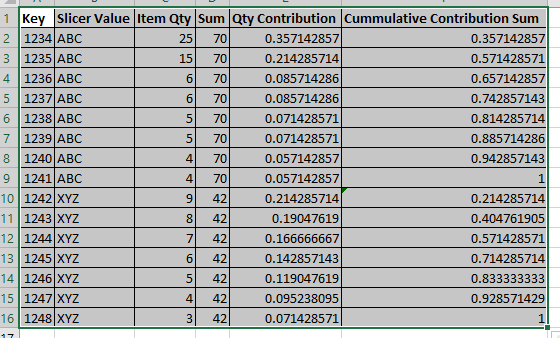
I have a data set like below.
I want to create measures Sum,Qty Contribution, Commulative Contribution. Here Sum is total of Item Qty for each slicer. Qty Contribution is weightage of that to total sum. i.e. Item Qty/Sum. Commulative Contribution is Cummulative Sum of Contribution.
Here challenge is bringing Slicer and Key into filter context. I can bring Slicer into filter context using SelectedValue function. But how to bring Key into filter context. Please help me to generate this calculation.
Thanks in Advance,
Rajesh S Hegde
Hi @hegde86
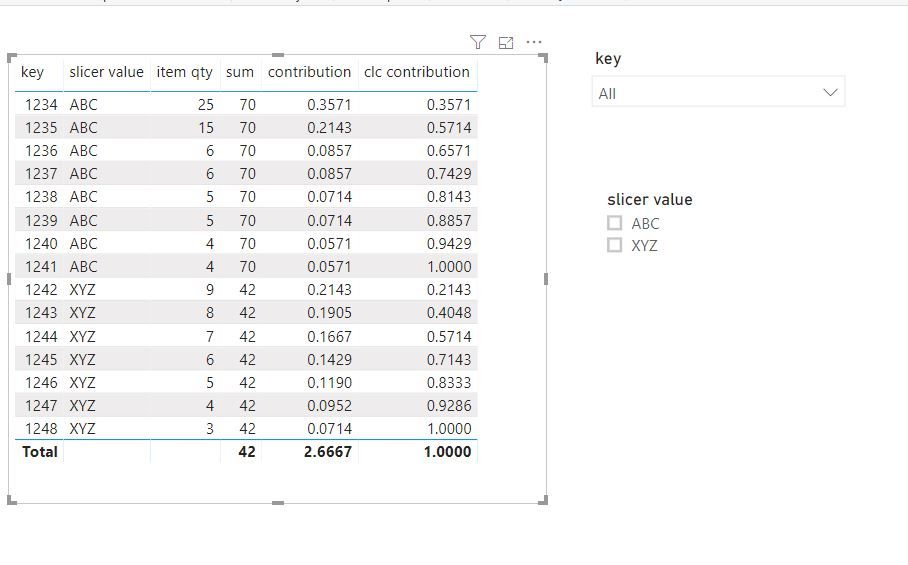
Create measures
sum = CALCULATE(SUM('Table'[item qty]),FILTER(ALLSELECTED('Table'),'Table'[slicer value]=MAX('Table'[slicer value])))
contribution = SUM('Table'[item qty])/[sum]
clc contribution =
SUMX (
FILTER (
ALLSELECTED ( 'Table' ),
'Table'[slicer value] = MAX ( 'Table'[slicer value] )
&& 'Table'[key] <= MAX ( 'Table'[key] )
),
[item qty]
) / [sum]
You can try
overAll =CALCULATE(sum(Sales[Sales]),ALLSELECTED()) Cont Sales = var var1 = CALCULATE(SUM(Sales[Sales]),ALLSELECTED()) return DIVIDE(SUM(Sales[Sales]),var1)*100
for running total refer
https://community.powerbi.com/t5/Desktop/Running-total/td-p/502657
https://community.powerbi.com/t5/Desktop/Cumulative-Total/td-p/43115
Check out the April 2026 Power BI update to learn about new features.
Sign up to receive a private message when registration opens and key events begin.
If you have recently started exploring Fabric, we'd love to hear how it's going. Your feedback can help with product improvements.
| User | Count |
|---|---|
| 38 | |
| 29 | |
| 28 | |
| 20 | |
| 18 |
| User | Count |
|---|---|
| 66 | |
| 34 | |
| 31 | |
| 25 | |
| 23 |