Get certified for free when you join Fabric Data Days 2026 and dive into Fabric, Power BI, SQL, AI, and other essential data skills.
Join nowJuly 7 - July 17 | Round 2 of the Power BI Dataviz World Championships. Don't miss your chance! Learn more
Hi,
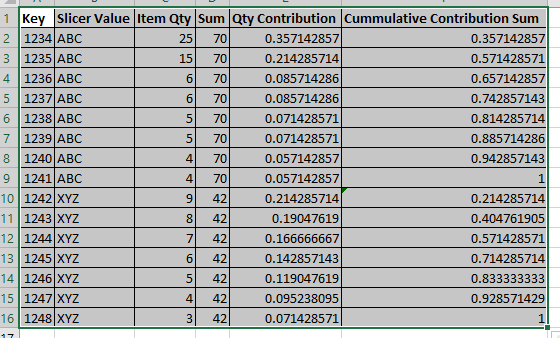
I have a data set like below.
I want to create measures Sum,Qty Contribution, Commulative Contribution. Here Sum is total of Item Qty for each slicer. Qty Contribution is weightage of that to total sum. i.e. Item Qty/Sum. Commulative Contribution is Cummulative Sum of Contribution.
Here challenge is bringing Slicer and Key into filter context. I can bring Slicer into filter context using SelectedValue function. But how to bring Key into filter context. Please help me to generate this calculation.
Thanks in Advance,
Rajesh S Hegde
Hi @hegde86
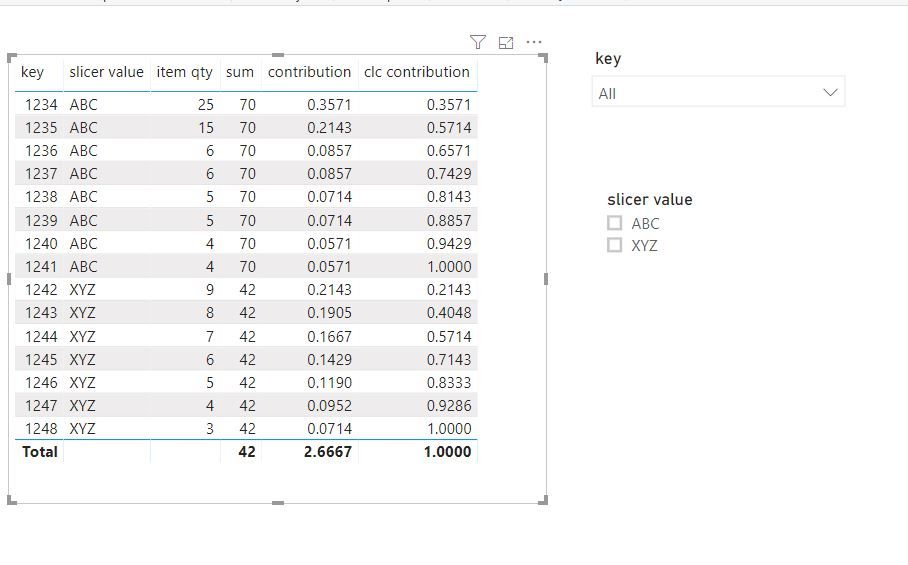
Create measures
sum = CALCULATE(SUM('Table'[item qty]),FILTER(ALLSELECTED('Table'),'Table'[slicer value]=MAX('Table'[slicer value])))
contribution = SUM('Table'[item qty])/[sum]
clc contribution =
SUMX (
FILTER (
ALLSELECTED ( 'Table' ),
'Table'[slicer value] = MAX ( 'Table'[slicer value] )
&& 'Table'[key] <= MAX ( 'Table'[key] )
),
[item qty]
) / [sum]
You can try
overAll =CALCULATE(sum(Sales[Sales]),ALLSELECTED()) Cont Sales = var var1 = CALCULATE(SUM(Sales[Sales]),ALLSELECTED()) return DIVIDE(SUM(Sales[Sales]),var1)*100
for running total refer
https://community.powerbi.com/t5/Desktop/Running-total/td-p/502657
https://community.powerbi.com/t5/Desktop/Cumulative-Total/td-p/43115
Join us in Barcelona for FabCon and SQLCon, the Fabric, Power BI, SQL, and AI community event. Save €200 with code FABCMTY200.
Join Fabric Data Days 2026: 60 days of free live/on-demand sessions, challenges, study groups, and certification opportunities.
| User | Count |
|---|---|
| 22 | |
| 22 | |
| 18 | |
| 16 | |
| 13 |
| User | Count |
|---|---|
| 63 | |
| 42 | |
| 40 | |
| 40 | |
| 38 |