Join us at FabCon Atlanta from March 16 - 20, 2026, for the ultimate Fabric, Power BI, AI and SQL community-led event. Save $200 with code FABCOMM.
Register now!The Power BI Data Visualization World Championships is back! Get ahead of the game and start preparing now! Learn more
Hello,
I am trying to create a visualization based on the following E.G. table:
Is there anyway to have all this information all in one visual ? Something along the line of a calendar or gant chart.
I have already created a generic date table but encountered active relationship issues. Additionally, I also tried using the USERELATIONSHIP but to no success.
Thank you for your time,
Teodor
Solved! Go to Solution.
Hi @Teodor_TRU
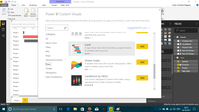
1. There is a visual similar to Gantt Chart....
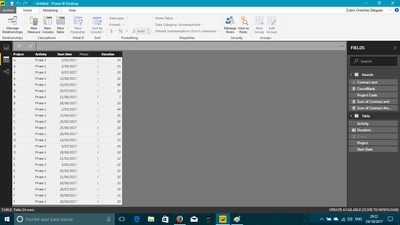
2. For using this chart, you need to shape your table like this...
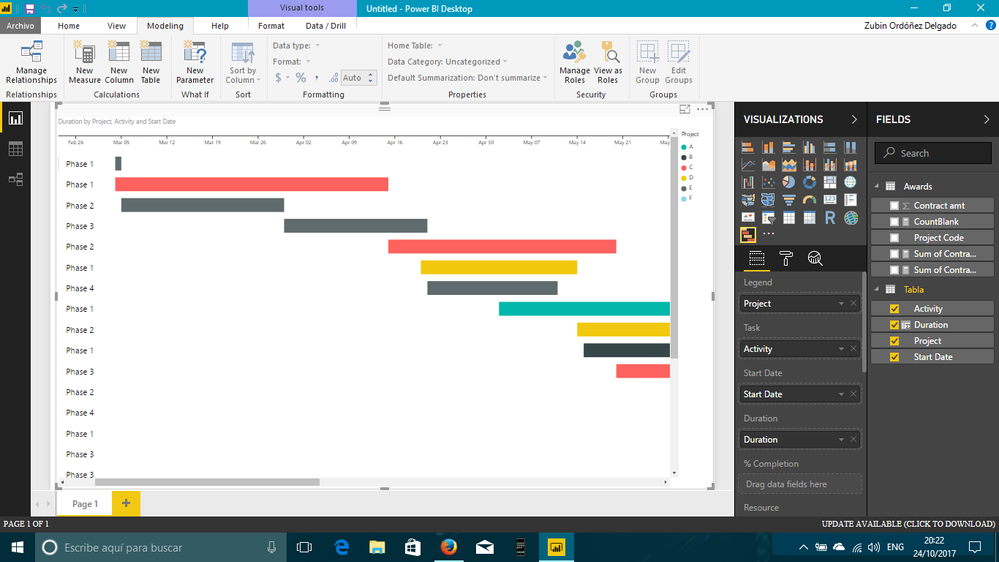
3. Then, the final result is...
I hope this helps
Regards
BILASolution
Hi @Teodor_TRU
1. There is a visual similar to Gantt Chart....
2. For using this chart, you need to shape your table like this...
3. Then, the final result is...
I hope this helps
Regards
BILASolution
The Power BI Data Visualization World Championships is back! Get ahead of the game and start preparing now!
| User | Count |
|---|---|
| 63 | |
| 55 | |
| 42 | |
| 41 | |
| 23 |
| User | Count |
|---|---|
| 171 | |
| 136 | |
| 119 | |
| 79 | |
| 54 |