cancel
Showing results for 
Search instead for 
Did you mean: 

The Power BI Data Visualization World Championships is back! Get ahead of the game and start preparing now! Learn more

Reply
lanceadpear
Regular Visitor

Utilizing Fields from Multiple Tables In a Single Visualisation

Hi, everyone—new user to Power BI here. I've been messing around with it over the last week and have started to get the hang of it pretty well, but I have an target that I'm having trouble hitting. Please consider the following information:


Goal: Show how much what percentage of retainer hours is being logged by someone other than the project manager responsible for them.


Table 1 - External Hours Logged:


Duration Logged - Reported By - Project Manager: 


1AllisonJohn
AllisonAshley 
FranklinTim
AllisonJohn 
PaulAshley 
5Franklin Tim 


Table 2 - Retainer Hours Assigned:


Client - Retainer Hours - Project Manager:


A5John
BAshley 
CTim
DJohn 
E10 Ashley 
F20Tim 


Ideal Results:


Percentage of Retainer Hours Billed Externally:

John = 6 (External Hours) / 10 (Retainer Hours Assigned) x 100 = 60%

Ashley = 9 (External Hours) / 15 (Retainer Hours Assigned) x 100 = 60%

Tim = 9 (External Hours) / 23 (Retainer Hours Assigned) x 100 = 39%


The problem is, I don't seem to be able to achieve my ideal results—either via new column fields or visualizations.


Can anyone point me in the right direction to solve, what would seem to be, a fairly basic computation?

1 ACCEPTED SOLUTION
Vvelarde
Community Champion
Community Champion

@lanceadpear


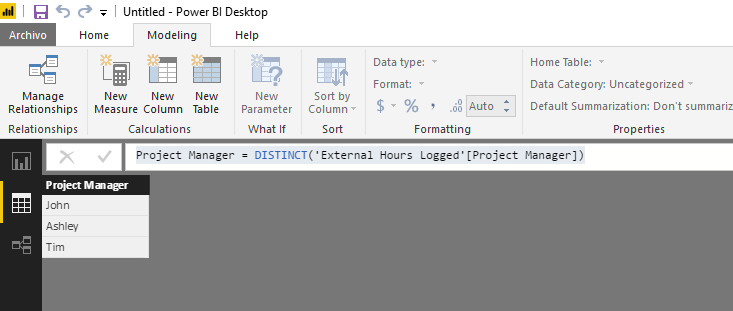
Hi, Create a new Table


IMG1.png


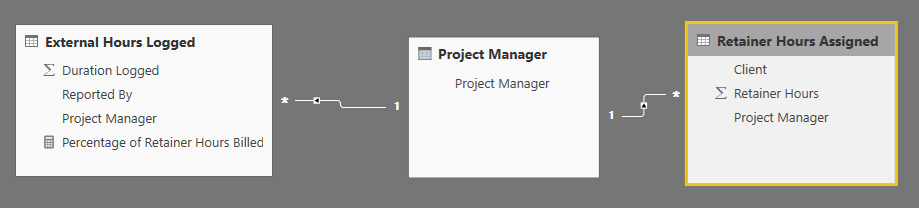
Related with your 2 tables


IMG2.png


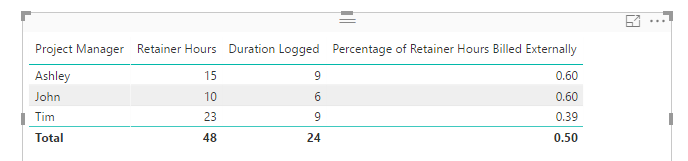
Use a measure:


Percentage of Retainer Hours Billed Externally =
DIVIDE (
    SUM ( 'External Hours Logged'[Duration Logged] ),
    SUM ( 'Retainer Hours Assigned'[Retainer Hours] )
)

IMG3.png


Regards


Victor

Lima - Peru


Lima - Peru

View solution in original post

4 REPLIES 4
Vvelarde
Community Champion
Community Champion

@lanceadpear


Hi, Create a new Table


IMG1.png


Related with your 2 tables


IMG2.png


Use a measure:


Percentage of Retainer Hours Billed Externally =
DIVIDE (
    SUM ( 'External Hours Logged'[Duration Logged] ),
    SUM ( 'Retainer Hours Assigned'[Retainer Hours] )
)

IMG3.png


Regards


Victor

Lima - Peru


Lima - Peru
lanceadpear
Regular Visitor

Hi, everyone—new user to Power BI here. I've been messing around with it over the last week and have started to get the hang of it pretty well, but I have an target that I'm having trouble hitting. Please consider the following information:


Goal: Show how much what percentage of retainer hours is being logged by someone other than the project manager responsible for them.


Table 1 - External Hours Logged:


Duration Logged - Reported By - Project Manager: 


1AllisonJohn
AllisonAshley 
FranklinTim
AllisonJohn 
PaulAshley 
5Franklin Tim 


Table 2 - Retainer Hours Assigned:


Client - Retainer Hours - Project Manager:


A5John
BAshley 
CTim
DJohn 
E10 Ashley 
F20Tim 


Ideal Results:


Percentage of Retainer Hours Billed Externally:

John = 6 (External Hours) / 10 (Retainer Hours Assigned) x 100 = 60%

Ashley = 9 (External Hours) / 15 (Retainer Hours Assigned) x 100 = 60%

Tim = 9 (External Hours) / 23 (Retainer Hours Assigned) x 100 = 39%


The problem is, I don't seem to be able to achieve my ideal results—either via new column fields or visualizations.


Can anyone point me in the right direction to solve, what would seem to be, a fairly basic computation?

Here are some measures that will work assuming you use a table visual where you first place the Retainer[PM] (for Project manager in the retainer hours table) in the first column:

EHoursSum = SUMX(FILTER(External, 
External[PM] = MAX(Retainer[PM])),
External[Duration]) RHoursSum = SUM(Retainer[Rhours]) Percentage = [EHoursSum]/[RHoursSum]

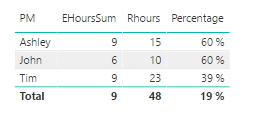
Place the measures in your table visual to get this:

image.png

Now, this would be much easier if you had a third table that contained the unique names of all Project Managers and created a relationship from that table to each of the other two tables. You can easily create such a table by using Create Table and enter:

PMTable = SUMMARIZE(Retainer, Retainer[PM])

Then create the relationships. Now the task becomes much simpler. Place PMTable[PM] in your table visual. Then create a new measure:

Percentage2 = SUM(External[Duration])/SUM(Retainer[RHours])

and place it in the table visual. Done.

BTW I should mention that when I copied the tables from your post, there where trailing spaces after some of the values including some of the Project Manager names. If that exists in your data you may run into trouble. You would see that when you check your PMTable, if the same name shows up more than once, you have some data cleaning issues.

Helpful resources

Announcements
Power BI DataViz World Championships

Power BI Dataviz World Championships

The Power BI Data Visualization World Championships is back! Get ahead of the game and start preparing now!

December 2025 Power BI Update Carousel

Power BI Monthly Update - December 2025

Check out the December 2025 Power BI Holiday Recap!

FabCon Atlanta 2026 carousel

FabCon Atlanta 2026

Join us at FabCon Atlanta, March 16-20, for the ultimate Fabric, Power BI, AI and SQL community-led event. Save $200 with code FABCOMM.

Top Solution Authors