This time we’re going bigger than ever. Fabric, Power BI, SQL, AI and more. We're covering it all. You won't want to miss it.
Learn moreLevel up your Power BI skills this month - build one visual each week and tell better stories with data! Get started
Hello, I was hoping someone could point out what I am doing wrong.
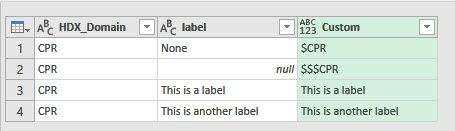
I am using Power Query to check two columns for conditions and if they relsove to be true then update a third column. What I have so far is below
= Table.AddColumn(#"Replaced Value34", "Custom", each if [HDX_Domain] = "CPR" and [label] ="None" then "$CPR"
else if [HDX_Domain] = "CPR" and [label] is null then "$$$CPR"
else [label])
The first part works when it finds "None" in the [label] column, however I cannot seem to get Power Query to recognize the null in my column.
Thanks
Solved! Go to Solution.
Try this, I think you just need to change to the [label] = null
Table.AddColumn(#"Changed Type", "Custom", each if [HDX_Domain] = "CPR" and [label] = "None" then "$CPR" else if [HDX_Domain] = "CPR" and [label] = null then "$$$CPR" else [label])
Try this, I think you just need to change to the [label] = null
Table.AddColumn(#"Changed Type", "Custom", each if [HDX_Domain] = "CPR" and [label] = "None" then "$CPR" else if [HDX_Domain] = "CPR" and [label] = null then "$$$CPR" else [label])
Thank you. I will give this a try.
Check out the April 2026 Power BI update to learn about new features.
Sign up to receive a private message when registration opens and key events begin.
If you have recently started exploring Fabric, we'd love to hear how it's going. Your feedback can help with product improvements.
| User | Count |
|---|---|
| 37 | |
| 32 | |
| 27 | |
| 24 | |
| 17 |
| User | Count |
|---|---|
| 70 | |
| 50 | |
| 31 | |
| 26 | |
| 22 |