Join us at FabCon Atlanta from March 16 - 20, 2026, for the ultimate Fabric, Power BI, AI and SQL community-led event. Save $200 with code FABCOMM.
Register now!The Power BI Data Visualization World Championships is back! It's time to submit your entry. Live now!
Hello, I was hoping someone could point out what I am doing wrong.
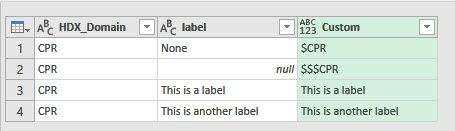
I am using Power Query to check two columns for conditions and if they relsove to be true then update a third column. What I have so far is below
= Table.AddColumn(#"Replaced Value34", "Custom", each if [HDX_Domain] = "CPR" and [label] ="None" then "$CPR"
else if [HDX_Domain] = "CPR" and [label] is null then "$$$CPR"
else [label])
The first part works when it finds "None" in the [label] column, however I cannot seem to get Power Query to recognize the null in my column.
Thanks
Solved! Go to Solution.
Try this, I think you just need to change to the [label] = null
Table.AddColumn(#"Changed Type", "Custom", each if [HDX_Domain] = "CPR" and [label] = "None" then "$CPR" else if [HDX_Domain] = "CPR" and [label] = null then "$$$CPR" else [label])
Try this, I think you just need to change to the [label] = null
Table.AddColumn(#"Changed Type", "Custom", each if [HDX_Domain] = "CPR" and [label] = "None" then "$CPR" else if [HDX_Domain] = "CPR" and [label] = null then "$$$CPR" else [label])
Thank you. I will give this a try.
The Power BI Data Visualization World Championships is back! It's time to submit your entry.
Check out the January 2026 Power BI update to learn about new features.
| User | Count |
|---|---|
| 61 | |
| 48 | |
| 35 | |
| 25 | |
| 23 |
| User | Count |
|---|---|
| 142 | |
| 111 | |
| 65 | |
| 38 | |
| 33 |