Join us at FabCon Atlanta from March 16 - 20, 2026, for the ultimate Fabric, Power BI, AI and SQL community-led event. Save $200 with code FABCOMM.
Register now!The Power BI Data Visualization World Championships is back! It's time to submit your entry. Live now!
Hi All,
I have a table named A where in, below values were present
Id Region Java Python Unix AgentsName
-----------------------------------------------------------------------------------------------
1 UK 1 0 0 Java
2 UK 0 1 0 Python
3 UK 0 0 1 Unix
4 UK 1 1 0 Java+Python
5 UK 1 0 1 Java+Unix
6 UK 0 1 1 Python+Unix
I also have a another table named B with the values like below
ListName AgentName
--------------------------------
Unix Unix
Unix Unix+Python
Unix Unix+Java
Unix All
Java Java
Java Java+Unix
Java Java+Python
Java All
Python Python
Python Python+Unix
Python Python+Java
Python All
From the above table, in power bi..with the help of ListName column in Table B, i need the data to be filtered in Table A. I am using Slicer visual here and kept the ListName column from TableB. It must select all the combinations that are in Table A. That means, if i select Unix, then all the combinations that contain Unix must be shown, which are Java+Unix, Python+Unix, Unix+Python, Unix+Java, Unix, ALL.
Please help me to get et this achieved in Power BI
Solved! Go to Solution.
Hi @Sudharshan1919 ,
Please try below steps:
1. create a measure with below dax formula
Measure =
VAR cur_lname =
SELECTEDVALUE ( 'Table B'[ListName] )
VAR cur_aname =
SELECTEDVALUE ( 'Table A'[AgentsName] )
VAR _val =
IF ( CONTAINSSTRING ( cur_aname, cur_lname ), 1 )
RETURN
IF ( NOT ( ISFILTERED ( 'Table B'[ListName] ) ), 1, _val )
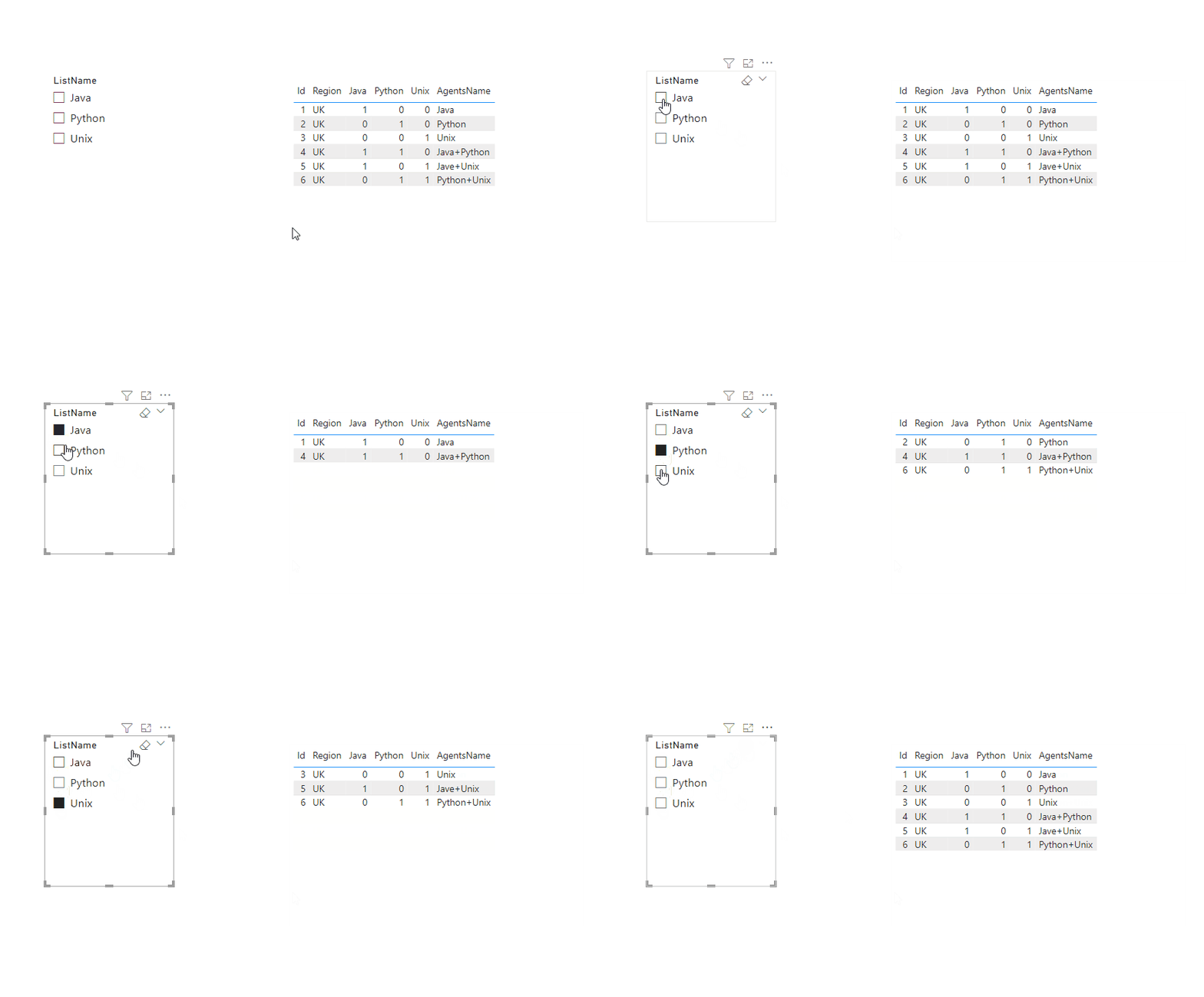
2. add a table visual with Table A fields, add a sclicer with Table B [ListName], add the measure to the table visual filter pan and set
Please refer the attached .pbix file.
Best regards,
Community Support Team_Binbin Yu
If this post helps, then please consider Accept it as the solution to help the other members find it more quickly.
Hi @Sudharshan1919 ,
Please try below steps:
1. create a measure with below dax formula
Measure =
VAR cur_lname =
SELECTEDVALUE ( 'Table B'[ListName] )
VAR cur_aname =
SELECTEDVALUE ( 'Table A'[AgentsName] )
VAR _val =
IF ( CONTAINSSTRING ( cur_aname, cur_lname ), 1 )
RETURN
IF ( NOT ( ISFILTERED ( 'Table B'[ListName] ) ), 1, _val )
2. add a table visual with Table A fields, add a sclicer with Table B [ListName], add the measure to the table visual filter pan and set
Please refer the attached .pbix file.
Best regards,
Community Support Team_Binbin Yu
If this post helps, then please consider Accept it as the solution to help the other members find it more quickly.
HEllo @Sudharshan1919 ,
You need to build a relationship between the two tables by agentname then you use list name to filter.
check this on how to build a relationship between tables https://learn.microsoft.com/en-us/power-bi/transform-model/desktop-create-and-manage-relationships
If I answered your question, please mark my post as solution, Appreciate your Kudos 👍
Follow me on Linkedin
Vote For my Idea 💡
Proud to be a Super User! | |
Hello @Idrissshatila ,
I have already tried the approach that you have given, before posting this. But that couldnt satisfy my requirement. As you mentioned i have also used ListName column in the slicer, but when selecting the value in the slicer , in the below grid only the values that having that value are only being displayed. For example, if i select Unix... only Unix and All option are only displayed, but not able to display the combination values (Unix+Python, Unix+Java).
Kindly help me for this..
Thanks
The Power BI Data Visualization World Championships is back! It's time to submit your entry.
Check out the January 2026 Power BI update to learn about new features.
| User | Count |
|---|---|
| 60 | |
| 49 | |
| 30 | |
| 25 | |
| 23 |
| User | Count |
|---|---|
| 131 | |
| 103 | |
| 58 | |
| 39 | |
| 31 |