cancel
Showing results for 
Search instead for 
Did you mean: 

The Power BI Data Visualization World Championships is back! Get ahead of the game and start preparing now! Learn more

Reply
Sudharshan1919
Helper III
Helper III

Multiple Combination selection using Slicer

Hi All,

I have a table named A where in, below values were present


Id      Region              Java                 Python             Unix                AgentsName
-----------------------------------------------------------------------------------------------
1      UK                       1                          0                    0                        Java
2      UK                       0                          1                    0                      Python
3      UK                       0                          0                    1                        Unix
4      UK                       1                          1                    0                  Java+Python
5      UK                       1                          0                    1                  Java+Unix
6      UK                       0                          1                    1                  Python+Unix


I also have a another table named B with the values like below


ListName        AgentName
--------------------------------
Unix                 Unix
Unix             Unix+Python
Unix             Unix+Java
Unix                   All
Java               Java
Java               Java+Unix
Java               Java+Python
Java               All
Python       Python
Python       Python+Unix
Python       Python+Java
Python       All


From the above table, in power bi..with the help of ListName column in Table B, i need the data to be filtered in Table A. I am using Slicer visual here and kept the ListName column from TableB. It must select all the combinations that are in Table A. That means, if i select Unix, then all the combinations that contain Unix must be shown, which are Java+Unix, Python+Unix, Unix+Python, Unix+Java, Unix, ALL.
Please help me to get et this achieved in Power BI

1 ACCEPTED SOLUTION
Anonymous
Not applicable

Hi @Sudharshan1919 ,

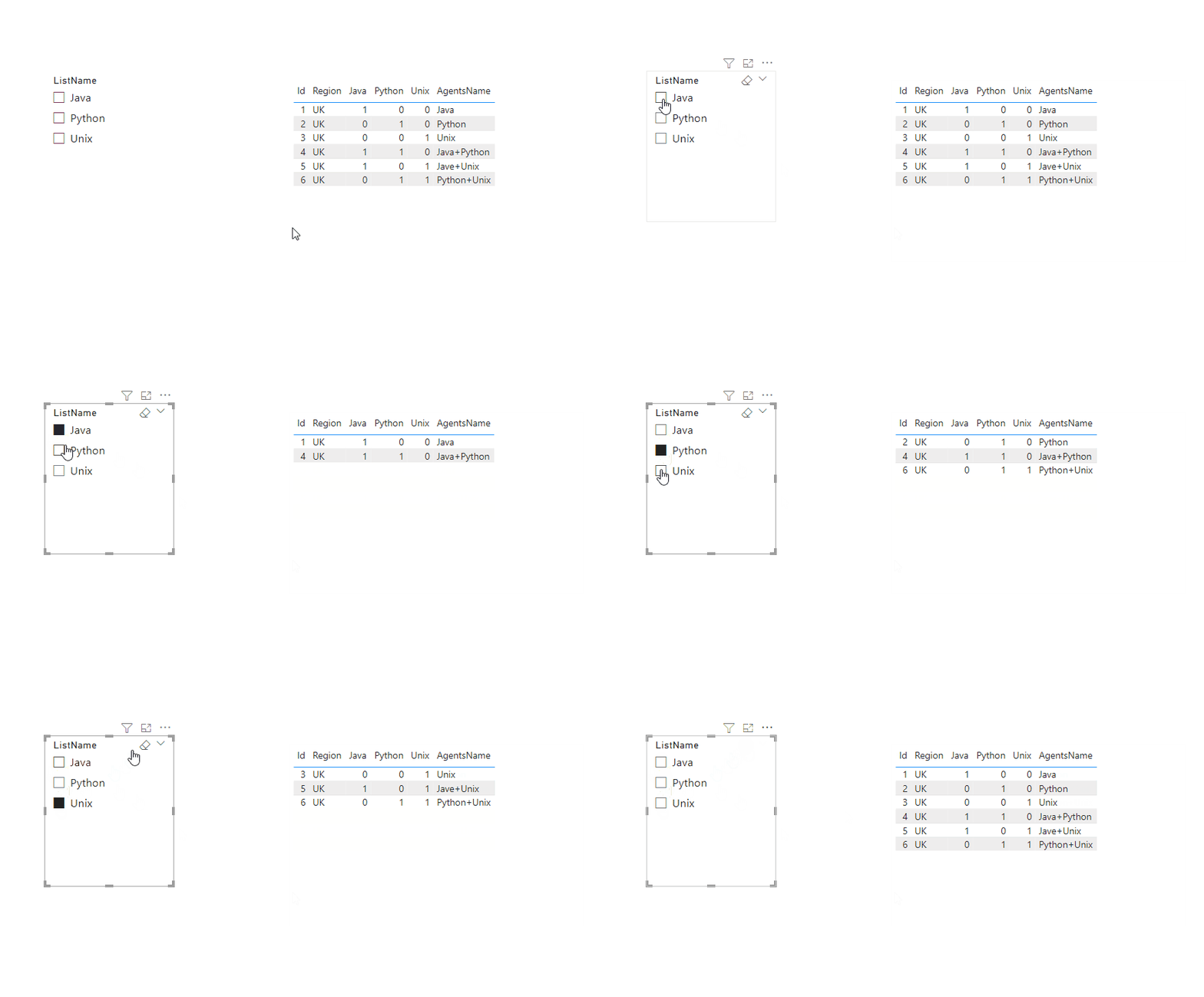
Please try below steps:

1. create a measure with below dax formula

Measure =
VAR cur_lname =
    SELECTEDVALUE ( 'Table B'[ListName] )
VAR cur_aname =
    SELECTEDVALUE ( 'Table A'[AgentsName] )
VAR _val =
    IF ( CONTAINSSTRING ( cur_aname, cur_lname ), 1 )
RETURN
    IF ( NOT ( ISFILTERED ( 'Table B'[ListName] ) ), 1, _val )

2. add a table visual with Table A fields, add a sclicer with Table B [ListName], add the measure to the table visual filter pan and set

Animation21.gif

Please refer the attached .pbix file.


Best regards,
Community Support Team_Binbin Yu
If this post helps, then please consider Accept it as the solution to help the other members find it more quickly.

View solution in original post

3 REPLIES 3
Anonymous
Not applicable

Hi @Sudharshan1919 ,

Please try below steps:

1. create a measure with below dax formula

Measure =
VAR cur_lname =
    SELECTEDVALUE ( 'Table B'[ListName] )
VAR cur_aname =
    SELECTEDVALUE ( 'Table A'[AgentsName] )
VAR _val =
    IF ( CONTAINSSTRING ( cur_aname, cur_lname ), 1 )
RETURN
    IF ( NOT ( ISFILTERED ( 'Table B'[ListName] ) ), 1, _val )

2. add a table visual with Table A fields, add a sclicer with Table B [ListName], add the measure to the table visual filter pan and set

Animation21.gif

Please refer the attached .pbix file.


Best regards,
Community Support Team_Binbin Yu
If this post helps, then please consider Accept it as the solution to help the other members find it more quickly.

Idrissshatila
Super User
Super User

HEllo @Sudharshan1919 ,


You need to build a relationship between the two tables by agentname then you use list name to filter.

check this on how to build a relationship between tables https://learn.microsoft.com/en-us/power-bi/transform-model/desktop-create-and-manage-relationships


If I answered your question, please mark my post as solution, Appreciate your Kudos 👍

Follow me on Linkedin
Vote For my Idea 💡


Did I answer your question? Mark my post as a solution! Appreciate your Kudos
Follow me on LinkedIn linkedIn
Vote for my Community Mobile App Idea

Proud to be a Super User!


Hello @Idrissshatila ,


I have already tried the approach that you have given, before posting this. But that couldnt satisfy my requirement. As you mentioned i have also used ListName column in the slicer, but when selecting the value in the slicer , in the below grid only the values that having that value are only being displayed. For example, if i select Unix... only Unix and All option are only displayed, but not able to display the combination values (Unix+Python, Unix+Java).
Kindly help me for this..


Thanks

Helpful resources

Announcements
Power BI DataViz World Championships

Power BI Dataviz World Championships

The Power BI Data Visualization World Championships is back! Get ahead of the game and start preparing now!

December 2025 Power BI Update Carousel

Power BI Monthly Update - December 2025

Check out the December 2025 Power BI Holiday Recap!

FabCon Atlanta 2026 carousel

FabCon Atlanta 2026

Join us at FabCon Atlanta, March 16-20, for the ultimate Fabric, Power BI, AI and SQL community-led event. Save $200 with code FABCOMM.

Top Solution Authors