cancel
Showing results for 
Search instead for 
Did you mean: 

July 28 - August 9 | Final Round of the Power BI Dataviz World Championships. This is your chance. Learn more

Reply
Sudharshan1919
Helper III
Helper III

Multiple Combination selection using Slicer

Hi All,

I have a table named A where in, below values were present


Id      Region              Java                 Python             Unix                AgentsName
-----------------------------------------------------------------------------------------------
1      UK                       1                          0                    0                        Java
2      UK                       0                          1                    0                      Python
3      UK                       0                          0                    1                        Unix
4      UK                       1                          1                    0                  Java+Python
5      UK                       1                          0                    1                  Java+Unix
6      UK                       0                          1                    1                  Python+Unix


I also have a another table named B with the values like below


ListName        AgentName
--------------------------------
Unix                 Unix
Unix             Unix+Python
Unix             Unix+Java
Unix                   All
Java               Java
Java               Java+Unix
Java               Java+Python
Java               All
Python       Python
Python       Python+Unix
Python       Python+Java
Python       All


From the above table, in power bi..with the help of ListName column in Table B, i need the data to be filtered in Table A. I am using Slicer visual here and kept the ListName column from TableB. It must select all the combinations that are in Table A. That means, if i select Unix, then all the combinations that contain Unix must be shown, which are Java+Unix, Python+Unix, Unix+Python, Unix+Java, Unix, ALL.
Please help me to get et this achieved in Power BI

1 ACCEPTED SOLUTION
Anonymous
Not applicable

Hi @Sudharshan1919 ,

Please try below steps:

1. create a measure with below dax formula

Measure =
VAR cur_lname =
    SELECTEDVALUE ( 'Table B'[ListName] )
VAR cur_aname =
    SELECTEDVALUE ( 'Table A'[AgentsName] )
VAR _val =
    IF ( CONTAINSSTRING ( cur_aname, cur_lname ), 1 )
RETURN
    IF ( NOT ( ISFILTERED ( 'Table B'[ListName] ) ), 1, _val )

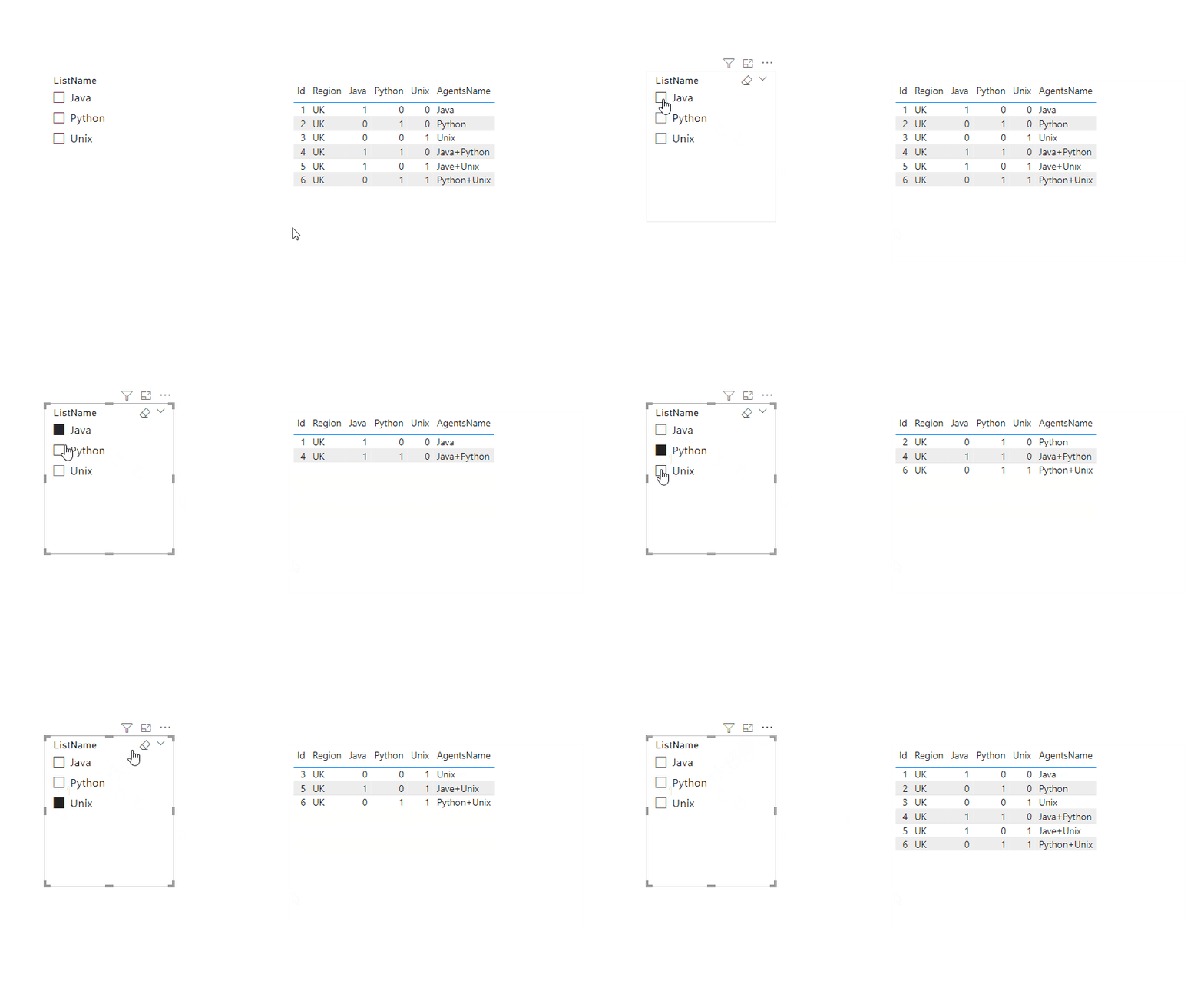
2. add a table visual with Table A fields, add a sclicer with Table B [ListName], add the measure to the table visual filter pan and set

Animation21.gif

Please refer the attached .pbix file.


Best regards,
Community Support Team_Binbin Yu
If this post helps, then please consider Accept it as the solution to help the other members find it more quickly.

View solution in original post

3 REPLIES 3
Anonymous
Not applicable

Hi @Sudharshan1919 ,

Please try below steps:

1. create a measure with below dax formula

Measure =
VAR cur_lname =
    SELECTEDVALUE ( 'Table B'[ListName] )
VAR cur_aname =
    SELECTEDVALUE ( 'Table A'[AgentsName] )
VAR _val =
    IF ( CONTAINSSTRING ( cur_aname, cur_lname ), 1 )
RETURN
    IF ( NOT ( ISFILTERED ( 'Table B'[ListName] ) ), 1, _val )

2. add a table visual with Table A fields, add a sclicer with Table B [ListName], add the measure to the table visual filter pan and set

Animation21.gif

Please refer the attached .pbix file.


Best regards,
Community Support Team_Binbin Yu
If this post helps, then please consider Accept it as the solution to help the other members find it more quickly.

Idrissshatila
Super User
Super User

HEllo @Sudharshan1919 ,


You need to build a relationship between the two tables by agentname then you use list name to filter.

check this on how to build a relationship between tables https://learn.microsoft.com/en-us/power-bi/transform-model/desktop-create-and-manage-relationships


If I answered your question, please mark my post as solution, Appreciate your Kudos 👍

Follow me on Linkedin
Vote For my Idea 💡


Did I answer your question? Mark my post as a solution! Appreciate your Kudos
Follow me on LinkedIn linkedIn
Vote for my Community Mobile App Idea

Proud to be a Super User!


Hello @Idrissshatila ,


I have already tried the approach that you have given, before posting this. But that couldnt satisfy my requirement. As you mentioned i have also used ListName column in the slicer, but when selecting the value in the slicer , in the below grid only the values that having that value are only being displayed. For example, if i select Unix... only Unix and All option are only displayed, but not able to display the combination values (Unix+Python, Unix+Java).
Kindly help me for this..


Thanks

Helpful resources

Announcements
FabCon and SQLCon Barcelona 2026

FabCon & SQLCon – Barcelona 2026

Join us in Barcelona for FabCon and SQLCon, the Fabric, Power BI, SQL, and AI community event. Save €200 with code FABCMTY200.

Fabric Community Sticker Design Challenge Barcelona Carousel

Fabric Community Sticker Challenge - Barcelona 2026

If you love stickers, then you will definitely want to check out our community sticker challenge, Barcelona edition!

July Power BI Update Carousel

Power BI Monthly Update - July 2026

Check out the July 2026 Power BI update to learn about new features.

Power BI DataViz World Championships carousel

Power BI DataViz World Championships - June 2026

A new Power BI DataViz World Championship is coming this June! Don't miss out on submitting your entry.

Top Solution Authors