Don't miss your chance to take the Fabric Data Engineer (DP-600) exam for FREE! Find out how by attending the DP-600 session on April 23rd (pacific time), live or on-demand.
Learn moreNext up in the FabCon + SQLCon recap series: The roadmap for Microsoft SQL and Maximizing Developer experiences in Fabric. All sessions are available on-demand after the live show. Register now
Is there an option to change the Display Units in the Multi Row Card? For Example to Millions/Billions 4M 1B. Or is there another downloadable Visual that gives me the same look as a multi Row card with this option?
Thanks!
Solved! Go to Solution.
Hi @mcornfield
Currently, multi-row-card can't format display units like single card visual. But you can achieve your goal by building measures.
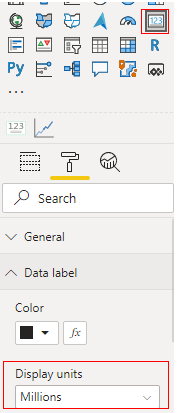
Single card visual has display units in Date Lable.
Multi-row-card doesn't.
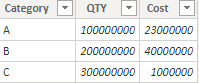
I build a sample table to have a test.
Measure:
M_Cost =
VAR _A = DIVIDE(SUM('Table'[Cost]),10^6)
return
_A&""&"M"M_QTY =
VAR _A = DIVIDE(SUM('Table'[QTY]),10^8)
return
_A&""&"B"
If you want to show Million you can build a measure like M_Cost, or billion you can build a measure like M_QTY.
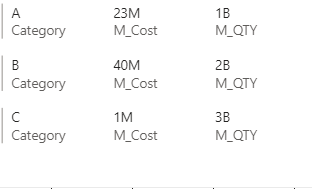
Result:
You can vote up the idea for display units function in multi-row-card. Link: Idea
Best Regards,
Rico Zhou
If this post helps, then please consider Accept it as the solution to help the other members find it more quickly.
Hi @mcornfield
Currently, multi-row-card can't format display units like single card visual. But you can achieve your goal by building measures.
Single card visual has display units in Date Lable.
Multi-row-card doesn't.
I build a sample table to have a test.
Measure:
M_Cost =
VAR _A = DIVIDE(SUM('Table'[Cost]),10^6)
return
_A&""&"M"M_QTY =
VAR _A = DIVIDE(SUM('Table'[QTY]),10^8)
return
_A&""&"B"
If you want to show Million you can build a measure like M_Cost, or billion you can build a measure like M_QTY.
Result:
You can vote up the idea for display units function in multi-row-card. Link: Idea
Best Regards,
Rico Zhou
If this post helps, then please consider Accept it as the solution to help the other members find it more quickly.
Whenever I try this, it uses that measure as a title for the Multi-Row Card and not something to display on the Multi-Row Card. I need my measures to reflect the correct display Units.
If you have recently started exploring Fabric, we'd love to hear how it's going. Your feedback can help with product improvements.
A new Power BI DataViz World Championship is coming this June! Don't miss out on submitting your entry.
| User | Count |
|---|---|
| 46 | |
| 43 | |
| 39 | |
| 19 | |
| 15 |
| User | Count |
|---|---|
| 68 | |
| 68 | |
| 31 | |
| 27 | |
| 24 |