Don't miss your chance to take the Fabric Data Engineer (DP-600) exam for FREE! Find out how by watching the DP-600 session on-demand now through April 28th.
Learn moreJoin the FabCon + SQLCon recap series. Up next: Power BI, Real-Time Intelligence, IQ and AI, and Data Factory take center stage. All sessions are available on-demand after the live show. Register now
Is there an option to change the Display Units in the Multi Row Card? For Example to Millions/Billions 4M 1B. Or is there another downloadable Visual that gives me the same look as a multi Row card with this option?
Thanks!
Solved! Go to Solution.
Hi @mcornfield
Currently, multi-row-card can't format display units like single card visual. But you can achieve your goal by building measures.
Single card visual has display units in Date Lable.
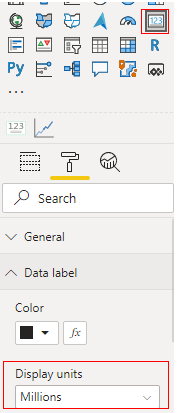
Multi-row-card doesn't.
I build a sample table to have a test.
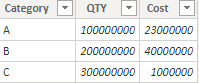
Measure:
M_Cost =
VAR _A = DIVIDE(SUM('Table'[Cost]),10^6)
return
_A&""&"M"M_QTY =
VAR _A = DIVIDE(SUM('Table'[QTY]),10^8)
return
_A&""&"B"
If you want to show Million you can build a measure like M_Cost, or billion you can build a measure like M_QTY.
Result:
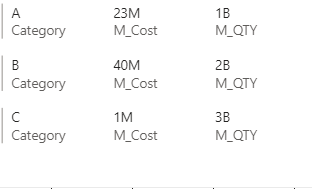
You can vote up the idea for display units function in multi-row-card. Link: Idea
Best Regards,
Rico Zhou
If this post helps, then please consider Accept it as the solution to help the other members find it more quickly.
Hi @mcornfield
Currently, multi-row-card can't format display units like single card visual. But you can achieve your goal by building measures.
Single card visual has display units in Date Lable.
Multi-row-card doesn't.
I build a sample table to have a test.
Measure:
M_Cost =
VAR _A = DIVIDE(SUM('Table'[Cost]),10^6)
return
_A&""&"M"M_QTY =
VAR _A = DIVIDE(SUM('Table'[QTY]),10^8)
return
_A&""&"B"
If you want to show Million you can build a measure like M_Cost, or billion you can build a measure like M_QTY.
Result:
You can vote up the idea for display units function in multi-row-card. Link: Idea
Best Regards,
Rico Zhou
If this post helps, then please consider Accept it as the solution to help the other members find it more quickly.
Whenever I try this, it uses that measure as a title for the Multi-Row Card and not something to display on the Multi-Row Card. I need my measures to reflect the correct display Units.
Check out the April 2026 Power BI update to learn about new features.
If you have recently started exploring Fabric, we'd love to hear how it's going. Your feedback can help with product improvements.
A new Power BI DataViz World Championship is coming this June! Don't miss out on submitting your entry.
| User | Count |
|---|---|
| 45 | |
| 38 | |
| 34 | |
| 21 | |
| 17 |
| User | Count |
|---|---|
| 66 | |
| 64 | |
| 31 | |
| 26 | |
| 26 |