Get Fabric or SQL Certified for Free.
Get certified for free when you join Fabric Data Days 2026 and dive into Fabric, Power BI, SQL, AI, and other essential data skills.
Join now- Power BI forums
- Get Help with Power BI
- Desktop
- Service
- Report Server
- Power Query
- Mobile Apps
- Developer
- DAX Commands and Tips
- Custom Visuals Development Discussion
- Health and Life Sciences
- Power BI Spanish forums
- Translated Spanish Desktop
- Training and Consulting
- Instructor Led Training
- Dashboard in a Day for Women, by Women
- Galleries
- Data Stories Gallery
- Themes Gallery
- Contests Gallery
- QuickViz Gallery
- Quick Measures Gallery
- Visual Calculations Gallery
- Fabric Apps Gallery
- Notebook Gallery
- Translytical Task Flow Gallery
- TMDL Gallery
- R Script Showcase
- Webinars and Video Gallery
- Ideas
- Custom Visuals Ideas (read-only)
- Issues
- Issues
- Events
- Upcoming Events
July 7 - July 17 | Round 2 of the Power BI Dataviz World Championships. Don't miss your chance! Learn more
- Power BI forums
- Forums
- Get Help with Power BI
- Desktop
- Multi Date Comparison
- Subscribe to RSS Feed
- Mark Topic as New
- Mark Topic as Read
- Float this Topic for Current User
- Bookmark
- Subscribe
- Printer Friendly Page

- Mark as New
- Bookmark
- Subscribe
- Mute
- Subscribe to RSS Feed
- Permalink
- Report Inappropriate Content
Multi Date Comparison
I am looking at college registration data that contains the date in which a student adds a class. I would like to determine in which week of the term the class was added. I have two tables:
1. Registration table which contains the Add_Date.
2. Term_Date table which contains: Term_Start, End_First_Week, End_Second_Week, End_Third_Week, Term_End (out to 11th week).
The Term_Date table is formatted with acolumn for each of the 11 weeks. I could easly pivot this to rows if the calucaltion would be eaiser.
Question: How would I compare the Add_Date to all the other dates to calculate which week the student added the course? A huge IF statment? I know there has to be a higher level function to help me with this but I've not been able to figure it out just yet.
Thanks in advance!
Solved! Go to Solution.


- Mark as New
- Bookmark
- Subscribe
- Mute
- Subscribe to RSS Feed
- Permalink
- Report Inappropriate Content
Hi @Anonymous,
Unpivot table first to get below data structure.
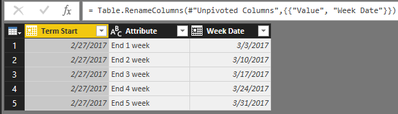
Add two calculated columns using below DAX formula:
Rank =
RANKX (
    FILTER (
        Term_DateTerm,
        Term_DateTerm[Term Start] = EARLIER ( Term_DateTerm[Term Start] )
    ),
    Term_DateTerm[Week Date],
    ,
    ASC,
    DENSE
)

Previous Week =
IF (
    LOOKUPVALUE (
        Term_DateTerm[Week Date],
        Term_DateTerm[Term Start], Term_DateTerm[Term Start],
        Term_DateTerm[Rank], Term_DateTerm[Rank] - 1
    )
        = BLANK (),
    Term_DateTerm[Term Start],
    LOOKUPVALUE (
        Term_DateTerm[Week Date],
        Term_DateTerm[Term Start], Term_DateTerm[Term Start],
        Term_DateTerm[Rank], Term_DateTerm[Rank] - 1
    )
)
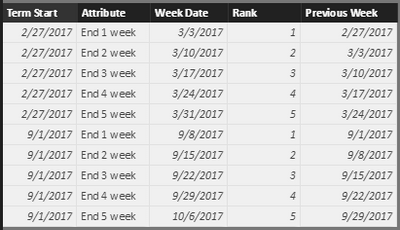
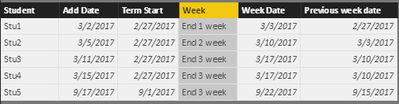
Cross join Registration table and Term_Date table.
Table 2 =
CROSSJOIN (
    'Registration table',
    SELECTCOLUMNS (
        Term_DateTerm,
        "Term Start", Term_DateTerm[Term Start],
        "Week", Term_DateTerm[Attribute],
        "Week Date", Term_DateTerm[Week Date],
        "Previous week date", Term_DateTerm[Previous Week]
    )
)
Filter above table returned via crossjoin.
Table 3 =
FILTER (
    'Table 2',
    'Table 2'[Add Date] >= 'Table 2'[Previous week date]
        && 'Table 2'[Add Date] <= 'Table 2'[Week Date]
)
Best regards,
Yuliana Gu
If this post helps, then please consider Accept it as the solution to help the other members find it more quickly.


- Mark as New
- Bookmark
- Subscribe
- Mute
- Subscribe to RSS Feed
- Permalink
- Report Inappropriate Content
another entirely different approach would be to create a newTermDateTable where there are 2 columns: Date, Term
in your example there are 11 weeks and so this newTermDateTable would have 77 rows; 1 per actual date, and then place whichever term descriptor is appropriariate in the Term field. That that term repeats for 11 rows then changes, etc.
with the newTermDateTable then join to your registration table by the Date fields.
- Mark as New
- Bookmark
- Subscribe
- Mute
- Subscribe to RSS Feed
- Permalink
- Report Inappropriate Content
Not quite following you, CahabaData. So if the table you are referencing looks like below, the actual registration date the student record has may fall between two of these rows, not necessarily equal to a specific date. Only approach I can think of would be to write logic that identifies the two dates that the registration date falls between in order to identify the description row. Correct?
Term Date WeekEndDate
1 1/4/2016 1
1 1/8/2016 2
1 1/15/2016 3
1 1/22/2016 4
1 1/29/2016 5
1 2/5/2016 6
....
Thanks!
- Mark as New
- Bookmark
- Subscribe
- Mute
- Subscribe to RSS Feed
- Permalink
- Report Inappropriate Content
in your post there are 11 weeks and so this newTermDateTable would have 77 rows; 1 per sequential date for 11 weeks....in your example there are not sequential dates, they have gaps.... with sequential there is every date - therefore you can simply do a join .
every Reg Table Add Date will have a corresponding date join in the newTermDateTable - and thereby you can use the info in the next field/column
I probably should refer to it as a Calendar Table as that is the term most frequently used in BI.
- Mark as New
- Bookmark
- Subscribe
- Mute
- Subscribe to RSS Feed
- Permalink
- Report Inappropriate Content
Too obvious and I should have interpreted your earlier message that way. Thank you again!
- Mark as New
- Bookmark
- Subscribe
- Mute
- Subscribe to RSS Feed
- Permalink
- Report Inappropriate Content
Hi @Anonymous,
Have you resolved your issue? If yes, please kindly mark the corresponding reply as an answer so that others having similar requirement can find the solution more easily. If you still have any question, please feel free to ask. Thanks for your understanding.
Regards,
Yuliana Gu
If this post helps, then please consider Accept it as the solution to help the other members find it more quickly.
- Mark as New
- Bookmark
- Subscribe
- Mute
- Subscribe to RSS Feed
- Permalink
- Report Inappropriate Content
Hi @Anonymous,
Unpivot table first to get below data structure.
Add two calculated columns using below DAX formula:
Rank =
RANKX (
    FILTER (
        Term_DateTerm,
        Term_DateTerm[Term Start] = EARLIER ( Term_DateTerm[Term Start] )
    ),
    Term_DateTerm[Week Date],
    ,
    ASC,
    DENSE
)

Previous Week =
IF (
    LOOKUPVALUE (
        Term_DateTerm[Week Date],
        Term_DateTerm[Term Start], Term_DateTerm[Term Start],
        Term_DateTerm[Rank], Term_DateTerm[Rank] - 1
    )
        = BLANK (),
    Term_DateTerm[Term Start],
    LOOKUPVALUE (
        Term_DateTerm[Week Date],
        Term_DateTerm[Term Start], Term_DateTerm[Term Start],
        Term_DateTerm[Rank], Term_DateTerm[Rank] - 1
    )
)
Cross join Registration table and Term_Date table.
Table 2 =
CROSSJOIN (
    'Registration table',
    SELECTCOLUMNS (
        Term_DateTerm,
        "Term Start", Term_DateTerm[Term Start],
        "Week", Term_DateTerm[Attribute],
        "Week Date", Term_DateTerm[Week Date],
        "Previous week date", Term_DateTerm[Previous Week]
    )
)
Filter above table returned via crossjoin.
Table 3 =
FILTER (
    'Table 2',
    'Table 2'[Add Date] >= 'Table 2'[Previous week date]
        && 'Table 2'[Add Date] <= 'Table 2'[Week Date]
)
Best regards,
Yuliana Gu
If this post helps, then please consider Accept it as the solution to help the other members find it more quickly.
- Mark as New
- Bookmark
- Subscribe
- Mute
- Subscribe to RSS Feed
- Permalink
- Report Inappropriate Content
Thank you very much, Yuliana!
Helpful resources

FabCon & SQLCon – Barcelona 2026
Join us in Barcelona for FabCon and SQLCon, the Fabric, Power BI, SQL, and AI community event. Save €200 with code FABCMTY200.

Power BI Monthly Update - July 2026
Check out the July 2026 Power BI update to learn about new features.

Data Days 2026
Join Data Days 2026: 60 days of free live/on-demand sessions, challenges, study groups, and certification opportunities.

Power BI DataViz World Championships - June 2026
A new Power BI DataViz World Championship is coming this June! Don't miss out on submitting your entry.

| User | Count |
|---|---|
| 30 | |
| 26 | |
| 25 | |
| 25 | |
| 16 |


| User | Count |
|---|---|
| 54 | |
| 34 | |
| 27 | |
| 23 | |
| 20 |


