Join us at FabCon Atlanta from March 16 - 20, 2026, for the ultimate Fabric, Power BI, AI and SQL community-led event. Save $200 with code FABCOMM.
Register now!Vote for your favorite vizzies from the Power BI Dataviz World Championship submissions. Vote now!
Hello all
I am puzzled with formatting the information that shows when I mouse over a clustered bar chart.
My visual has 2 values ACT YTD and BUD YTD, when I mouse over the ACT YTD the number of the tooltip is a whole number with 3 decimals. When I mouse over the BUD YTD the number is a whole number with no decimals.
Is there a way to:
First: Both values to have the same format, preferably no decimals.
Second: how to further format the tooltip on mouse over. For example can I show the numbers in thousand, million etc?
Thanks a lot
fanis
Solved! Go to Solution.
Hi @Anonymous ,
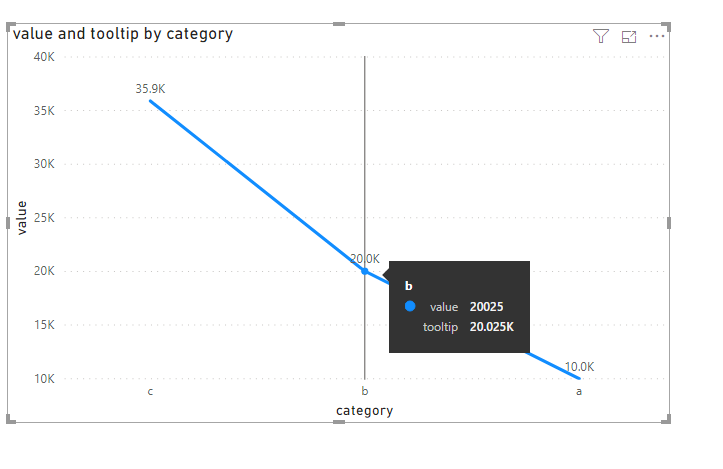
We can create a measure as below and add it to the tooltip to work around.
For more details, please check the pbix as attached.
Has this been resolved yet ? Can we supress the original tool tip value to not display when we hover the mouse on the visualizations ?
Hi @Anonymous ,
We can create a measure as below and add it to the tooltip to work around.
For more details, please check the pbix as attached.
Hi @Anonymous ,
use the Modeling tab, select the column which you want to format and choose the format.
Or look at this.
https://docs.microsoft.com/en-us/power-bi/desktop-custom-format-strings
Marcus Wegener works as Full Stack Power BI Engineer at BI or DIE.
His mission is clear: "Get the most out of data, with Power BI."
twitter - LinkedIn - YouTube - website - podcast - Power BI Tutorials
This is the best solution!!!
Vote for your favorite vizzies from the Power BI World Championship submissions!
If you love stickers, then you will definitely want to check out our Community Sticker Challenge!
Check out the January 2026 Power BI update to learn about new features.
| User | Count |
|---|---|
| 64 | |
| 53 | |
| 42 | |
| 20 | |
| 17 |
| User | Count |
|---|---|
| 124 | |
| 105 | |
| 44 | |
| 32 | |
| 24 |