Join us at FabCon Atlanta from March 16 - 20, 2026, for the ultimate Fabric, Power BI, AI and SQL community-led event. Save $200 with code FABCOMM.
Register now!The Power BI Data Visualization World Championships is back! Get ahead of the game and start preparing now! Learn more
Hello all
I am puzzled with formatting the information that shows when I mouse over a clustered bar chart.
My visual has 2 values ACT YTD and BUD YTD, when I mouse over the ACT YTD the number of the tooltip is a whole number with 3 decimals. When I mouse over the BUD YTD the number is a whole number with no decimals.
Is there a way to:
First: Both values to have the same format, preferably no decimals.
Second: how to further format the tooltip on mouse over. For example can I show the numbers in thousand, million etc?
Thanks a lot
fanis
Solved! Go to Solution.
Hi @Anonymous ,
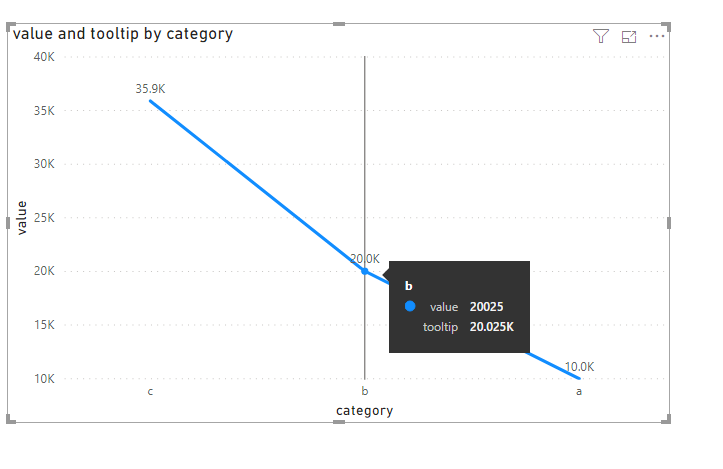
We can create a measure as below and add it to the tooltip to work around.
For more details, please check the pbix as attached.
Has this been resolved yet ? Can we supress the original tool tip value to not display when we hover the mouse on the visualizations ?
Hi @Anonymous ,
We can create a measure as below and add it to the tooltip to work around.
For more details, please check the pbix as attached.
Hi @Anonymous ,
use the Modeling tab, select the column which you want to format and choose the format.
Or look at this.
https://docs.microsoft.com/en-us/power-bi/desktop-custom-format-strings
Marcus Wegener works as Full Stack Power BI Engineer at BI or DIE.
His mission is clear: "Get the most out of data, with Power BI."
twitter - LinkedIn - YouTube - website - podcast - Power BI Tutorials
This is the best solution!!!
The Power BI Data Visualization World Championships is back! Get ahead of the game and start preparing now!
| User | Count |
|---|---|
| 57 | |
| 48 | |
| 35 | |
| 34 | |
| 21 |
| User | Count |
|---|---|
| 143 | |
| 122 | |
| 100 | |
| 80 | |
| 57 |