cancel
Showing results for 
Search instead for 
Did you mean: 

The Power BI Data Visualization World Championships is back! Get ahead of the game and start preparing now! Learn more

Reply
IamaDatanut
New Member

Missing Values for Rows

Hello Datanuts!


I am having trouble coming up with a solution - open to Power Query M or DAX solutions. Really at a loss. I have a table of values based on a SharePoint list. The Employees adding values to the list should enter a value for each day. I need to be able to track when there is a date that passes that they should be entering values in - but that there was no entry and therefore no row. I was able to figure out how to solve this is the table only had one employee in it. THis table however has over 50 individual employees - each with the potential to have missing days. 


Any ideas how I can ascertain when a specific employee did not enter a value in - or for that matter all employees not entering a value in for a working day? 


Thanks in advance - this has been a tough nut to crack!!


Current Table
NameValueEntry
Employee AXXXXX7/13/2020 5:00
Employee AXXXXX7/15/2020 5:00
Employee AXXXXX7/16/2020 5:00
Employee AXXXXX7/17/2020 5:00
Employee BXXXXX7/13/2020 5:00
Employee BXXXXX7/14/2020 5:00
Employee BXXXXX7/15/2020 5:00
Employee BXXXXX7/16/2020 5:00
Employee BXXXXX7/17/2020 5:00


THis is the table I need to create

Need to Count Days Missing Entries 
NameValueEntryTracking
Employee AXXXXX7/13/2020 5:00Yes
Employee AXXXXXnullNo
EmployeeXXXXX7/15/2020 5:00Yes
Employee AXXXXX7/16/2020 5:00Yes
Employee AXXXXX7/17/2020 5:00Yes
Employee BXXXXX7/13/2020 5:00Yes
Employee BXXXXX7/14/2020 5:00Yes
Employee BXXXXX7/15/2020 5:00Yes
Employee BXXXXX7/16/2020 5:00Yes
Employee BXXXXX7/17/2020 5:00Yes


1 ACCEPTED SOLUTION
Anonymous
Not applicable

Hi @IamaDatanut ,


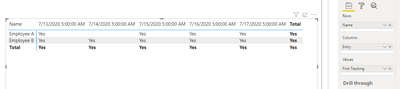
You have already get the tracking column in second table and the third table is what you want?

Then you should be able to create a matrix as below.

1.PNG


Best Regards,

Jay

View solution in original post

3 REPLIES 3
Anonymous
Not applicable

Hi @IamaDatanut ,


You have already get the tracking column in second table and the third table is what you want?

Then you should be able to create a matrix as below.

1.PNG


Best Regards,

Jay

IamaDatanut
New Member

Thanks for the response @amitchandak ! I corrected my reponse above.  I'm able to make the Tracking column, using DAX to create the Yes and No based on whether there are values in the 'entry' column. 


What I ultimately am looking to create is a method to identify that "Employee A" in the original table did not enter a value for 7/14/20. That's what row 2 in the second table is meant to represent. 


Since there was no entry for 7/14 - there is no value. When I have a source table with 50+ employees, and many of them will not enter for a given date - how do I determine that they did not enter anything in that date. 


Line 2 in the second table does not exist in the source data. I am attempting to solve it by adding a line based on the logic that I know 7/14 was a business day and "Employee A" does not have any values so that means they did not enter anything. 


I want to create a table of Yes/No to illustrate the employees did not enter values on certain dates - like this:


Name7/13/20207/14/20207/15/20207/16/20207/17/2020
Employee AYesNoYesYesYes
Employee BYesYesYesYesYes
Employee CYesNoYesYesYes
Employee DYesYesYesYesYes
Employee EYesYesNoYesYes
Employee FYesYesYesYesYes
amitchandak
Super User
Super User

@IamaDatanut , remove timestamp an create a date and join with a date table


Entry Date = [Entry].Date


Try like

Tracking = if(isblank(count(Table[Entry])), "No", "Yes")

Sum of No = Sumx(Table, if(isblank(count(Table[Entry])), 0, 1))


plot with date from date table


To get the best of the time intelligence function. Make sure you have a date calendar and it has been marked as the date in model view. Also, join it with the date column of your fact/s. Refer :radacad sqlbi My Video Series Appreciate your Kudos.


Please provide your feedback comments and advice for new videos
Tutorial Series Dax Vs SQL Direct Query PBI Tips
Appreciate your Kudos.

Share with Power BI Enthusiasts: Full Power BI Video (20 Hours) YouTube
Microsoft Fabric Series 60+ Videos YouTube
Microsoft Fabric Hindi End to End YouTube

Helpful resources

Announcements
Power BI DataViz World Championships

Power BI Dataviz World Championships

The Power BI Data Visualization World Championships is back! Get ahead of the game and start preparing now!

December 2025 Power BI Update Carousel

Power BI Monthly Update - December 2025

Check out the December 2025 Power BI Holiday Recap!

FabCon Atlanta 2026 carousel

FabCon Atlanta 2026

Join us at FabCon Atlanta, March 16-20, for the ultimate Fabric, Power BI, AI and SQL community-led event. Save $200 with code FABCOMM.