Join us at FabCon Atlanta from March 16 - 20, 2026, for the ultimate Fabric, Power BI, AI and SQL community-led event. Save $200 with code FABCOMM.
Register now!The Power BI Data Visualization World Championships is back! It's time to submit your entry. Live now!
Hello Datanuts!
I am having trouble coming up with a solution - open to Power Query M or DAX solutions. Really at a loss. I have a table of values based on a SharePoint list. The Employees adding values to the list should enter a value for each day. I need to be able to track when there is a date that passes that they should be entering values in - but that there was no entry and therefore no row. I was able to figure out how to solve this is the table only had one employee in it. THis table however has over 50 individual employees - each with the potential to have missing days.
Any ideas how I can ascertain when a specific employee did not enter a value in - or for that matter all employees not entering a value in for a working day?
Thanks in advance - this has been a tough nut to crack!!
| Current Table | ||
| Name | Value | Entry |
| Employee A | XXXXX | 7/13/2020 5:00 |
| Employee A | XXXXX | 7/15/2020 5:00 |
| Employee A | XXXXX | 7/16/2020 5:00 |
| Employee A | XXXXX | 7/17/2020 5:00 |
| Employee B | XXXXX | 7/13/2020 5:00 |
| Employee B | XXXXX | 7/14/2020 5:00 |
| Employee B | XXXXX | 7/15/2020 5:00 |
| Employee B | XXXXX | 7/16/2020 5:00 |
| Employee B | XXXXX | 7/17/2020 5:00 |
THis is the table I need to create
| Need to Count Days Missing Entries | |||
| Name | Value | Entry | Tracking |
| Employee A | XXXXX | 7/13/2020 5:00 | Yes |
| Employee A | XXXXX | null | No |
| Employee | XXXXX | 7/15/2020 5:00 | Yes |
| Employee A | XXXXX | 7/16/2020 5:00 | Yes |
| Employee A | XXXXX | 7/17/2020 5:00 | Yes |
| Employee B | XXXXX | 7/13/2020 5:00 | Yes |
| Employee B | XXXXX | 7/14/2020 5:00 | Yes |
| Employee B | XXXXX | 7/15/2020 5:00 | Yes |
| Employee B | XXXXX | 7/16/2020 5:00 | Yes |
| Employee B | XXXXX | 7/17/2020 5:00 | Yes |
Solved! Go to Solution.
Hi @IamaDatanut ,
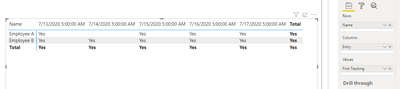
You have already get the tracking column in second table and the third table is what you want?
Then you should be able to create a matrix as below.
Best Regards,
Jay
Hi @IamaDatanut ,
You have already get the tracking column in second table and the third table is what you want?
Then you should be able to create a matrix as below.
Best Regards,
Jay
Thanks for the response @amitchandak ! I corrected my reponse above. I'm able to make the Tracking column, using DAX to create the Yes and No based on whether there are values in the 'entry' column.
What I ultimately am looking to create is a method to identify that "Employee A" in the original table did not enter a value for 7/14/20. That's what row 2 in the second table is meant to represent.
Since there was no entry for 7/14 - there is no value. When I have a source table with 50+ employees, and many of them will not enter for a given date - how do I determine that they did not enter anything in that date.
Line 2 in the second table does not exist in the source data. I am attempting to solve it by adding a line based on the logic that I know 7/14 was a business day and "Employee A" does not have any values so that means they did not enter anything.
I want to create a table of Yes/No to illustrate the employees did not enter values on certain dates - like this:
| Name | 7/13/2020 | 7/14/2020 | 7/15/2020 | 7/16/2020 | 7/17/2020 |
| Employee A | Yes | No | Yes | Yes | Yes |
| Employee B | Yes | Yes | Yes | Yes | Yes |
| Employee C | Yes | No | Yes | Yes | Yes |
| Employee D | Yes | Yes | Yes | Yes | Yes |
| Employee E | Yes | Yes | No | Yes | Yes |
| Employee F | Yes | Yes | Yes | Yes | Yes |
@IamaDatanut , remove timestamp an create a date and join with a date table
Entry Date = [Entry].Date
Try like
Tracking = if(isblank(count(Table[Entry])), "No", "Yes")
Sum of No = Sumx(Table, if(isblank(count(Table[Entry])), 0, 1))
plot with date from date table
To get the best of the time intelligence function. Make sure you have a date calendar and it has been marked as the date in model view. Also, join it with the date column of your fact/s. Refer :radacad sqlbi My Video Series Appreciate your Kudos.
Please provide your feedback comments and advice for new videos
Tutorial Series Dax Vs SQL Direct Query PBI Tips
Appreciate your Kudos.
| User | Count |
|---|---|
| 53 | |
| 40 | |
| 35 | |
| 24 | |
| 22 |
| User | Count |
|---|---|
| 134 | |
| 107 | |
| 57 | |
| 43 | |
| 38 |