This time we’re going bigger than ever. Fabric, Power BI, SQL, AI and more. We're covering it all. You won't want to miss it.
Learn moreDid you hear? There's a new SQL AI Developer certification (DP-800). Start preparing now and be one of the first to get certified. Register now
Following the example of the implementation on the github repo:
https://github.com/barakb32/PBI-MTA
And the topics:
https://community.powerbi.com/t5/Desktop/Create-Milestone-Trend-Analysis-MTA-in-Power-BI/m-p/191509
https://community.powerbi.com/t5/Developer/Milestone-Trend-Analysis/m-p/1366360
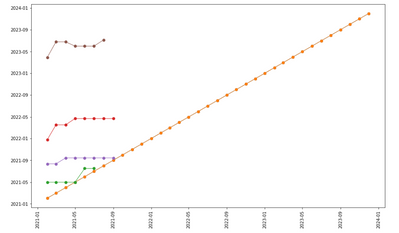
I want to create a milestone trend analysis like the image below:
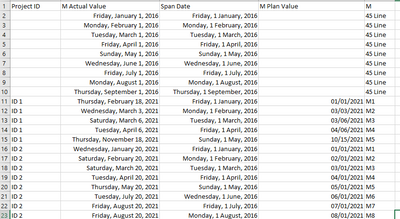
My dataset is in the following format:
And my python script:
# The following code to create a dataframe and remove duplicated rows is always executed and acts as a preamble for your script:
# dataset = pandas.DataFrame(M Actual Value, M, M Plan Value)
# dataset = dataset.drop_duplicates()
# Paste or type your script code here:
import matplotlib.pyplot as plt, datetime
import matplotlib.dates as mdates
dataset['Span Date']=pandas.to_datetime(dataset['Span Date'])
dataset['M Actual Value']=pandas.to_datetime(dataset['M Actual Value'])
pivot=pandas.pivot_table(dataset, aggfunc='first', index="M Actual Value", values='Span Date', columns='M')
for column in pivot:
clean=pivot[['45 Line',column]]
clean=clean[clean[column].notnull()]
plt.plot_date(clean['45 Line'],clean[column],xdate=True,ydate=True,ls='-', lw=1)
plt.xticks(rotation=0)
dtFmt = mdates.DateFormatter('%Y-%m') # define the formatting
plt.gca().xaxis.set_major_formatter(dtFmt)
plt.gca().yaxis.set_major_formatter(dtFmt)
plt.show()
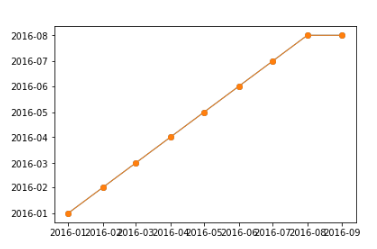
The final Output is:
Is there any way to display correct days? I notice years (1600+ etc) that are not in my data.
Solved! Go to Solution.
Hi @kala2
It seems that the problem is in your python statement, under the for column in pivot.
Because some rows with NaT, so you should try to remove the null rows.
I'm not particularly skilled in python either. Maybe this code replace it.
plt.plot_date(clean['45 Line'].dropna(axis=0).index,clean[column].dropna(axis=0).values,xdate=True,ydate=True,ls='-', lw=1)
Best Regards
Community Support Team _ chenwu zhu
If this post helps, then please consider Accept it as the solution to help the other members find it more quickly.
Hi @kala2
It seems that the problem is in your python statement, under the for column in pivot.
Because some rows with NaT, so you should try to remove the null rows.
I'm not particularly skilled in python either. Maybe this code replace it.
plt.plot_date(clean['45 Line'].dropna(axis=0).index,clean[column].dropna(axis=0).values,xdate=True,ydate=True,ls='-', lw=1)
Best Regards
Community Support Team _ chenwu zhu
If this post helps, then please consider Accept it as the solution to help the other members find it more quickly.
Check out the April 2026 Power BI update to learn about new features.
Sign up to receive a private message when registration opens and key events begin.
If you have recently started exploring Fabric, we'd love to hear how it's going. Your feedback can help with product improvements.
| User | Count |
|---|---|
| 34 | |
| 31 | |
| 25 | |
| 20 | |
| 16 |
| User | Count |
|---|---|
| 61 | |
| 49 | |
| 28 | |
| 23 | |
| 23 |