This time we’re going bigger than ever. Fabric, Power BI, SQL, AI and more. We're covering it all. You won't want to miss it.
Learn moreLevel up your Power BI skills this month - build one visual each week and tell better stories with data! Get started
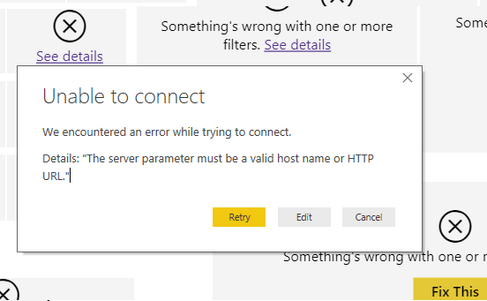
I have a Power BI workbook that is currently connected to an Azure SQL database. I have imported data in the current file. When I try to change the connection to an Azure Analysis Services database, I receive the following error:
As this workbook is fairly extensive, I am hoping there is a way to update the connection to AAS without having to create everything from scratch.
I have tried deleting all of the table/data, deleting permissions saved in the file and I still get the same error
@jmc,
You may check code in The Advanced Editor and take a look at this post.
I have a Power BI workbook that is currently connected to an Azure SQL database. I have imported data in the current file. When I try to change the connection to an Azure Analysis Services database, I receive the following error:
As this workbook is fairly extensive, I am hoping there is a way to update the connection to AAS without having to create everything from scratch.
I have tried deleting all of the table/data, deleting permissions saved in the file and I still get the same error
Check out the April 2026 Power BI update to learn about new features.
Sign up to receive a private message when registration opens and key events begin.
If you have recently started exploring Fabric, we'd love to hear how it's going. Your feedback can help with product improvements.
| User | Count |
|---|---|
| 30 | |
| 24 | |
| 23 | |
| 17 | |
| 15 |
| User | Count |
|---|---|
| 61 | |
| 36 | |
| 29 | |
| 22 | |
| 21 |