Learn from the best! Meet the four finalists headed to the FINALS of the Power BI Dataviz World Championships! Register now
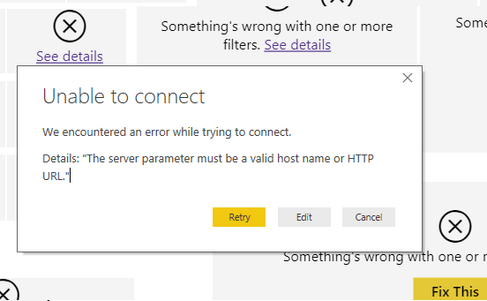
I have a Power BI workbook that is currently connected to an Azure SQL database. I have imported data in the current file. When I try to change the connection to an Azure Analysis Services database, I receive the following error:
As this workbook is fairly extensive, I am hoping there is a way to update the connection to AAS without having to create everything from scratch.
I have tried deleting all of the table/data, deleting permissions saved in the file and I still get the same error
@jmc,
You may check code in The Advanced Editor and take a look at this post.
I have a Power BI workbook that is currently connected to an Azure SQL database. I have imported data in the current file. When I try to change the connection to an Azure Analysis Services database, I receive the following error:
As this workbook is fairly extensive, I am hoping there is a way to update the connection to AAS without having to create everything from scratch.
I have tried deleting all of the table/data, deleting permissions saved in the file and I still get the same error
If you have recently started exploring Fabric, we'd love to hear how it's going. Your feedback can help with product improvements.
A new Power BI DataViz World Championship is coming this June! Don't miss out on submitting your entry.
Share feedback directly with Fabric product managers, participate in targeted research studies and influence the Fabric roadmap.
| User | Count |
|---|---|
| 56 | |
| 33 | |
| 32 | |
| 18 | |
| 16 |
| User | Count |
|---|---|
| 68 | |
| 67 | |
| 45 | |
| 30 | |
| 28 |