Learn from the best! Meet the four finalists headed to the FINALS of the Power BI Dataviz World Championships! Register now
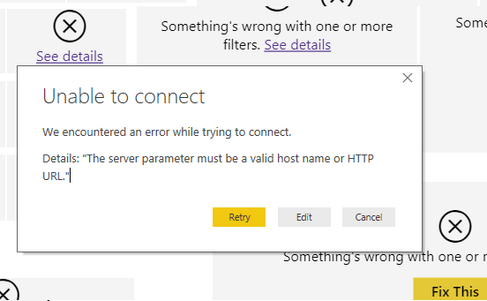
I have a Power BI workbook that is currently connected to an Azure SQL database. I have imported data in the current file. When I try to change the connection to an Azure Analysis Services database, I receive the following error:
As this workbook is fairly extensive, I am hoping there is a way to update the connection to AAS without having to create everything from scratch.
I have tried deleting all of the table/data, deleting permissions saved in the file and I still get the same error
@jmc,
You may check code in The Advanced Editor and take a look at this post.
I have a Power BI workbook that is currently connected to an Azure SQL database. I have imported data in the current file. When I try to change the connection to an Azure Analysis Services database, I receive the following error:
As this workbook is fairly extensive, I am hoping there is a way to update the connection to AAS without having to create everything from scratch.
I have tried deleting all of the table/data, deleting permissions saved in the file and I still get the same error
| User | Count |
|---|---|
| 55 | |
| 37 | |
| 26 | |
| 17 | |
| 17 |
| User | Count |
|---|---|
| 69 | |
| 58 | |
| 39 | |
| 21 | |
| 21 |