Join us at FabCon Atlanta from March 16 - 20, 2026, for the ultimate Fabric, Power BI, AI and SQL community-led event. Save $200 with code FABCOMM.
Register now!The Power BI Data Visualization World Championships is back! Get ahead of the game and start preparing now! Learn more
Hi community,
I have the following data model:
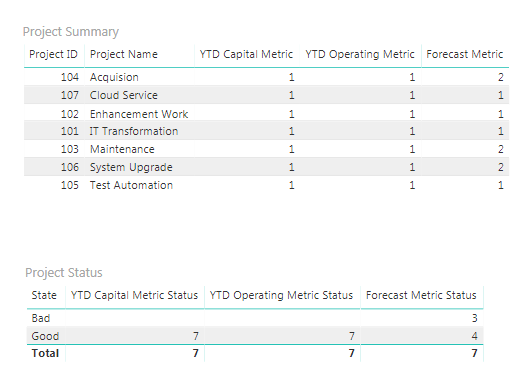
Each metric in Project table is created using calculated columns, and contains two different states: 1, and 2. I created a Status Coding table using Enter Data, with status 1 correponds to green state, and status 2 corresponds to red state. In my report page, I have two table visuals: Project Summary and Status Summary.
The Project Summary visual contains each project along with all associated metrics. For Status Summary visual, I created measure to count each metric state and show how many metrics are green and red state. I was hoping to use this table visual as a slicer, so if click on each metric count, it will filter out the projects in Project Summary. However, this does not apply correctly. I would appreciate if you could provide possible feedbacks or solutions to make this work!
The file is attached here:
@Anonymous,
You may try UNION Function to make the metrics in one column.
The Power BI Data Visualization World Championships is back! Get ahead of the game and start preparing now!
| User | Count |
|---|---|
| 39 | |
| 37 | |
| 33 | |
| 32 | |
| 29 |
| User | Count |
|---|---|
| 132 | |
| 86 | |
| 85 | |
| 68 | |
| 64 |