Join us at FabCon Atlanta from March 16 - 20, 2026, for the ultimate Fabric, Power BI, AI and SQL community-led event. Save $200 with code FABCOMM.
Register now!Get Fabric certified for FREE! Don't miss your chance! Learn more
Hi community,
I have the following data model:
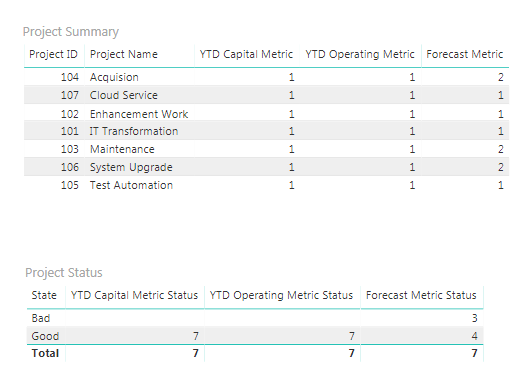
Each metric in Project table is created using calculated columns, and contains two different states: 1, and 2. I created a Status Coding table using Enter Data, with status 1 correponds to green state, and status 2 corresponds to red state. In my report page, I have two table visuals: Project Summary and Status Summary.
The Project Summary visual contains each project along with all associated metrics. For Status Summary visual, I created measure to count each metric state and show how many metrics are green and red state. I was hoping to use this table visual as a slicer, so if click on each metric count, it will filter out the projects in Project Summary. However, this does not apply correctly. I would appreciate if you could provide possible feedbacks or solutions to make this work!
The file is attached here:
@Anonymous,
You may try UNION Function to make the metrics in one column.
Share feedback directly with Fabric product managers, participate in targeted research studies and influence the Fabric roadmap.
Check out the January 2026 Power BI update to learn about new features.
| User | Count |
|---|---|
| 69 | |
| 59 | |
| 47 | |
| 20 | |
| 15 |
| User | Count |
|---|---|
| 106 | |
| 102 | |
| 38 | |
| 27 | |
| 27 |