Join us at FabCon Atlanta from March 16 - 20, 2026, for the ultimate Fabric, Power BI, AI and SQL community-led event. Save $200 with code FABCOMM.
Register now!The Power BI Data Visualization World Championships is back! Get ahead of the game and start preparing now! Learn more
Hiya,
So I'm wondering if theres a way to merge data for 2 coloumns ina table, without access to transform the data. Seems the permissions we have on the datasets at work do not allow this.
Example data (made up scenario):
| Shop Name | Sales | Revenue | Staff | Cakes Remaining |
Shop 1 | 10 | 500.00 | 8 | 100 |
| Shop 2 | 15 | 120.00 | 4 | 200 |
| Shop 3 | 100 | 63.22 | 3 | 8500 |
| Shop 4 | 20 | 9.22 | 5 | 600 |
So in the above you can see there are 4 shops. When in reality, there is actually only 3 shops because Shop 3 and Shop 4 is one shop, reporting as 2 different shops (if that makes sense). So essentially, I would like to be able to have a table showing something like below:
| Shop Name | Sales | Revenue | Staff | Cakes Remaining |
Shop 1 | 10 | 500.00 | 8 | 100 |
| Shop 2 | 15 | 120.00 | 4 | 200 |
| Shop 3 & Shop 4 Combined | 120 | 72.44 | 8 | 9100 |
I don't know if the above is possible, without the abaility to add an extra column and combine the data. Wondered if theres some sort of really elaborate measure I could use?
Solved! Go to Solution.
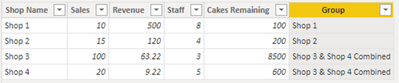
Try this calculated column using DAX:
Group =
IF ( Table1[Shop Name] IN {"Shop 3", "Shop 4"}, "Shop 3 & Shop 4 Combined", Table1[Shop Name] )
Use this column "Group" in your visual.
Proud to be a Super User!
Try this calculated column using DAX:
Group =
IF ( Table1[Shop Name] IN {"Shop 3", "Shop 4"}, "Shop 3 & Shop 4 Combined", Table1[Shop Name] )
Use this column "Group" in your visual.
Proud to be a Super User!
The Power BI Data Visualization World Championships is back! Get ahead of the game and start preparing now!
| User | Count |
|---|---|
| 171 | |
| 136 | |
| 119 | |
| 80 | |
| 54 |