Don't miss your chance to take the Fabric Data Engineer (DP-600) exam for FREE! Find out how by attending the DP-600 session on April 23rd (pacific time), live or on-demand.
Learn moreNext up in the FabCon + SQLCon recap series: The roadmap for Microsoft SQL and Maximizing Developer experiences in Fabric. All sessions are available on-demand after the live show. Register now
Hiya,
So I'm wondering if theres a way to merge data for 2 coloumns ina table, without access to transform the data. Seems the permissions we have on the datasets at work do not allow this.
Example data (made up scenario):
| Shop Name | Sales | Revenue | Staff | Cakes Remaining |
Shop 1 | 10 | 500.00 | 8 | 100 |
| Shop 2 | 15 | 120.00 | 4 | 200 |
| Shop 3 | 100 | 63.22 | 3 | 8500 |
| Shop 4 | 20 | 9.22 | 5 | 600 |
So in the above you can see there are 4 shops. When in reality, there is actually only 3 shops because Shop 3 and Shop 4 is one shop, reporting as 2 different shops (if that makes sense). So essentially, I would like to be able to have a table showing something like below:
| Shop Name | Sales | Revenue | Staff | Cakes Remaining |
Shop 1 | 10 | 500.00 | 8 | 100 |
| Shop 2 | 15 | 120.00 | 4 | 200 |
| Shop 3 & Shop 4 Combined | 120 | 72.44 | 8 | 9100 |
I don't know if the above is possible, without the abaility to add an extra column and combine the data. Wondered if theres some sort of really elaborate measure I could use?
Solved! Go to Solution.
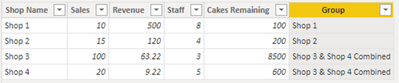
Try this calculated column using DAX:
Group =
IF ( Table1[Shop Name] IN {"Shop 3", "Shop 4"}, "Shop 3 & Shop 4 Combined", Table1[Shop Name] )
Use this column "Group" in your visual.
Proud to be a Super User!
Try this calculated column using DAX:
Group =
IF ( Table1[Shop Name] IN {"Shop 3", "Shop 4"}, "Shop 3 & Shop 4 Combined", Table1[Shop Name] )
Use this column "Group" in your visual.
Proud to be a Super User!
If you have recently started exploring Fabric, we'd love to hear how it's going. Your feedback can help with product improvements.
A new Power BI DataViz World Championship is coming this June! Don't miss out on submitting your entry.
| User | Count |
|---|---|
| 45 | |
| 43 | |
| 38 | |
| 19 | |
| 15 |
| User | Count |
|---|---|
| 67 | |
| 66 | |
| 31 | |
| 28 | |
| 24 |