cancel
Showing results for 
Search instead for 
Did you mean: 

Next up in the FabCon + SQLCon recap series: The roadmap for Microsoft SQL and Maximizing Developer experiences in Fabric. All sessions are available on-demand after the live show. Register now

Reply
RumSwift
Regular Visitor

Merging data without access to PowerQuery

Hiya,


So I'm wondering if theres a way to merge data for 2 coloumns ina  table, without access to transform the data. Seems the permissions we have on the datasets at work do not allow this.


Example data (made up scenario):

Shop NameSalesRevenueStaffCakes Remaining

Shop 1

10500.008100
Shop 215120.004200
Shop 310063.2238500
Shop 4209.225600


So in the above you can see there are 4 shops. When in reality, there is actually only 3 shops because Shop 3 and Shop 4 is one shop, reporting as 2 different shops (if that makes sense). So essentially, I would like to be able to have a table showing something like below:


Shop NameSalesRevenueStaffCakes Remaining

Shop 1

10500.008100
Shop 215120.004200
Shop 3 & Shop 4 Combined12072.4489100


I don't know if the above is possible, without the abaility to add an extra column and combine the data. Wondered if theres some sort of really elaborate measure I could use? 

1 ACCEPTED SOLUTION
DataInsights
Super User
Super User

@RumSwift,


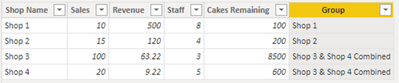
Try this calculated column using DAX:


Group = 
IF ( Table1[Shop Name] IN {"Shop 3", "Shop 4"}, "Shop 3 & Shop 4 Combined", Table1[Shop Name] )


DataInsights_0-1664040245469.png


Use this column "Group" in your visual.


Did I answer your question? Mark my post as a solution!

Proud to be a Super User!


View solution in original post

1 REPLY 1
DataInsights
Super User
Super User

@RumSwift,


Try this calculated column using DAX:


Group = 
IF ( Table1[Shop Name] IN {"Shop 3", "Shop 4"}, "Shop 3 & Shop 4 Combined", Table1[Shop Name] )


DataInsights_0-1664040245469.png


Use this column "Group" in your visual.


Did I answer your question? Mark my post as a solution!

Proud to be a Super User!


Helpful resources

Announcements
New to Fabric survey Carousel

New to Fabric Survey

If you have recently started exploring Fabric, we'd love to hear how it's going. Your feedback can help with product improvements.

Power BI DataViz World Championships carousel

Power BI DataViz World Championships - June 2026

A new Power BI DataViz World Championship is coming this June! Don't miss out on submitting your entry.

Join our Fabric User Panel

Join our Fabric User Panel

Share feedback directly with Fabric product managers, participate in targeted research studies and influence the Fabric roadmap.

March Power BI Update Carousel

Power BI Community Update - March 2026

Check out the March 2026 Power BI update to learn about new features.