Don't miss your chance to take the Fabric Data Engineer (DP-600) exam for FREE! Find out how by watching the DP-600 session on-demand now through April 28th.
Learn moreJoin the FabCon + SQLCon recap series. Up next: Power BI, Real-Time Intelligence, IQ and AI, and Data Factory take center stage. All sessions are available on-demand after the live show. Register now
Hiya,
So I'm wondering if theres a way to merge data for 2 coloumns ina table, without access to transform the data. Seems the permissions we have on the datasets at work do not allow this.
Example data (made up scenario):
| Shop Name | Sales | Revenue | Staff | Cakes Remaining |
Shop 1 | 10 | 500.00 | 8 | 100 |
| Shop 2 | 15 | 120.00 | 4 | 200 |
| Shop 3 | 100 | 63.22 | 3 | 8500 |
| Shop 4 | 20 | 9.22 | 5 | 600 |
So in the above you can see there are 4 shops. When in reality, there is actually only 3 shops because Shop 3 and Shop 4 is one shop, reporting as 2 different shops (if that makes sense). So essentially, I would like to be able to have a table showing something like below:
| Shop Name | Sales | Revenue | Staff | Cakes Remaining |
Shop 1 | 10 | 500.00 | 8 | 100 |
| Shop 2 | 15 | 120.00 | 4 | 200 |
| Shop 3 & Shop 4 Combined | 120 | 72.44 | 8 | 9100 |
I don't know if the above is possible, without the abaility to add an extra column and combine the data. Wondered if theres some sort of really elaborate measure I could use?
Solved! Go to Solution.
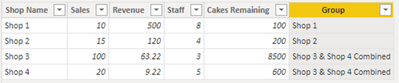
Try this calculated column using DAX:
Group =
IF ( Table1[Shop Name] IN {"Shop 3", "Shop 4"}, "Shop 3 & Shop 4 Combined", Table1[Shop Name] )
Use this column "Group" in your visual.
Proud to be a Super User!
Try this calculated column using DAX:
Group =
IF ( Table1[Shop Name] IN {"Shop 3", "Shop 4"}, "Shop 3 & Shop 4 Combined", Table1[Shop Name] )
Use this column "Group" in your visual.
Proud to be a Super User!
Check out the April 2026 Power BI update to learn about new features.
If you have recently started exploring Fabric, we'd love to hear how it's going. Your feedback can help with product improvements.
A new Power BI DataViz World Championship is coming this June! Don't miss out on submitting your entry.
| User | Count |
|---|---|
| 43 | |
| 38 | |
| 35 | |
| 21 | |
| 15 |
| User | Count |
|---|---|
| 63 | |
| 58 | |
| 28 | |
| 27 | |
| 25 |