cancel
Showing results for 
Search instead for 
Did you mean: 

Data Days is here! Join us now for 60+ days of learning, challenges, and connection. Learn more

Reply
Anonymous
Not applicable

Merge Visuals

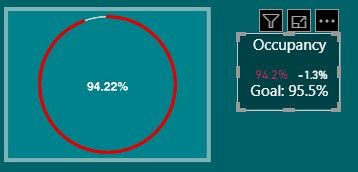
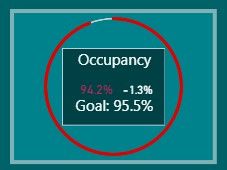
I am trying to combine the "Card with States" visual with the "PayPal KPI Donut Chart" into a single visual. I need it to be applicable in the Mobile View for Power Bi. Any Suggestions? I have attached photos of the two and a photo of one on top of the other, which is what i'm looking for, but as one visual that works in Mobile View.

Seperate.jpg


Together.jpg

1 ACCEPTED SOLUTION
dax
Community Support
Community Support

Hi acohen-ih-corp,

As I know, there is no  option to combine charts directly, Whenever I face a similar challenge I stack them up, and change the order of the visual (by selection pane)to a sequence based on requirement in desktop, then publish this to service and use mobile to open it, it will work well.

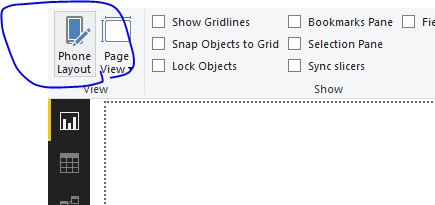
But I find that I can’t stack up in mobile view(phone layout) in desktop

94.PNG


So I suggest that you could post this requirement on power-bi-ideas.


By the way, could you please explain "which is what i'm looking for, but as one visual that works in Mobile View." in details?


Best Regards,

Zoe Zhi


If this post helps, then please consider Accept it as the solution to help the other members find it more quickly.

View solution in original post

2 REPLIES 2
dax
Community Support
Community Support

Hi acohen-ih-corp,

As I know, there is no  option to combine charts directly, Whenever I face a similar challenge I stack them up, and change the order of the visual (by selection pane)to a sequence based on requirement in desktop, then publish this to service and use mobile to open it, it will work well.

But I find that I can’t stack up in mobile view(phone layout) in desktop

94.PNG


So I suggest that you could post this requirement on power-bi-ideas.


By the way, could you please explain "which is what i'm looking for, but as one visual that works in Mobile View." in details?


Best Regards,

Zoe Zhi


If this post helps, then please consider Accept it as the solution to help the other members find it more quickly.

Anonymous
Not applicable

When i said "which is what i'm looking for, but as one visual that works in Mobile View." I meant a merged, or stacked, visual that functions in phone layout. But as you mentioned, we can't stack in Phone layout and organize according to the selection pane. Thank you for your help!

Helpful resources

Announcements
Fabric Data Days is here Carousel

Fabric Data Days 2026

Don't miss out on Data Days, June 15 through August 7. Learn Fabric, Power BI, SQL, AI and more.

May Power BI Update Carousel

Power BI Monthly Update - May 2026

Check out the May 2026 Power BI update to learn about new features.

Power BI DataViz World Championships carousel

Power BI DataViz World Championships - June 2026

A new Power BI DataViz World Championship is coming this June! Don't miss out on submitting your entry.