This time we’re going bigger than ever. Fabric, Power BI, SQL, AI and more. We're covering it all. You won't want to miss it.
Learn moreJoin the FabCon + SQLCon recap series. Up next: Power BI, Real-Time Intelligence, IQ and AI, and Data Factory take center stage. All sessions are available on-demand after the live show. Register now
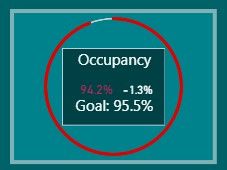
I am trying to combine the "Card with States" visual with the "PayPal KPI Donut Chart" into a single visual. I need it to be applicable in the Mobile View for Power Bi. Any Suggestions? I have attached photos of the two and a photo of one on top of the other, which is what i'm looking for, but as one visual that works in Mobile View.
Solved! Go to Solution.
Hi acohen-ih-corp,
As I know, there is no option to combine charts directly, Whenever I face a similar challenge I stack them up, and change the order of the visual (by selection pane)to a sequence based on requirement in desktop, then publish this to service and use mobile to open it, it will work well.
But I find that I can’t stack up in mobile view(phone layout) in desktop
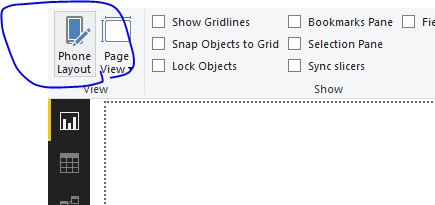
So I suggest that you could post this requirement on power-bi-ideas.
By the way, could you please explain "which is what i'm looking for, but as one visual that works in Mobile View." in details?
Best Regards,
Zoe Zhi
If this post helps, then please consider Accept it as the solution to help the other members find it more quickly.
Hi acohen-ih-corp,
As I know, there is no option to combine charts directly, Whenever I face a similar challenge I stack them up, and change the order of the visual (by selection pane)to a sequence based on requirement in desktop, then publish this to service and use mobile to open it, it will work well.
But I find that I can’t stack up in mobile view(phone layout) in desktop
So I suggest that you could post this requirement on power-bi-ideas.
By the way, could you please explain "which is what i'm looking for, but as one visual that works in Mobile View." in details?
Best Regards,
Zoe Zhi
If this post helps, then please consider Accept it as the solution to help the other members find it more quickly.
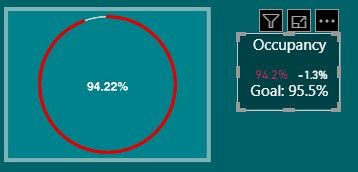
When i said "which is what i'm looking for, but as one visual that works in Mobile View." I meant a merged, or stacked, visual that functions in phone layout. But as you mentioned, we can't stack in Phone layout and organize according to the selection pane. Thank you for your help!
Check out the April 2026 Power BI update to learn about new features.
If you have recently started exploring Fabric, we'd love to hear how it's going. Your feedback can help with product improvements.
A new Power BI DataViz World Championship is coming this June! Don't miss out on submitting your entry.
| User | Count |
|---|---|
| 38 | |
| 38 | |
| 31 | |
| 22 | |
| 15 |
| User | Count |
|---|---|
| 74 | |
| 61 | |
| 31 | |
| 31 | |
| 23 |