Get certified for free when you join Fabric Data Days 2026 and dive into Fabric, Power BI, SQL, AI, and other essential data skills.
Join nowJuly 7 - July 17 | Round 2 of the Power BI Dataviz World Championships. Don't miss your chance! Learn more
Is it possible to create measure with Parameter.
For example
pcena = Calculate(
SUM(movement[pcena]);
FILTER(movement; movement[date] >= DATE(2016;3;14) && movement[date] <=DATE(2016;4;30)))
If I want to change dates, I will have to create another measure.
It would be nice to have
pcena(start,end) = Calculate(
SUM(movement[pcena]);
FILTER(movement; movement[date] >= start && movement[date] <=end)).
Evaluation would be
pcena(DATE(2016;3;14) ,DATE(2016;4;30)).
Hi Pstanek,
According to your description, you need to add parameters to the DAX expression when creating a measure, right?
Based on my research, referencing parameters is currently supported via the Data Source dialogs, Filter Rows, Keep Rows (top/bottom, etc.), Remove Rows (top/bottom, etc.) and Replace Values. So it seems that it is not supported to use a parameter in measure.
https://powerbi.microsoft.com/en-us/blog/power-bi-desktop-april-update-feature-summary/
If you have any concern on this feature, you can submit your idea on the link below. If this feature was mentioned by mulitple users, product team will consider to add this feature to next release.
https://ideas.powerbi.com/forums/265200-power-bi-i
Regards,
Charlie Liao
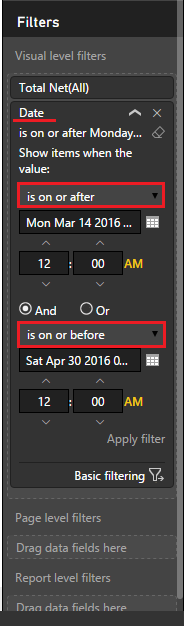
@pstanek Easiest thing to do is to drag your [Date] field to either the Visual or Page Level Filter
This way you can change the Date range for only the selected Visualization or the whole page
then click advanced filtering and select the dates from the calendar
Have you tried using a Slicer for this? There is a custom Visual that will most likely help you out on this. You can down load the custom visual here. To learn more about the Timeline Slicer, you can read about it here.
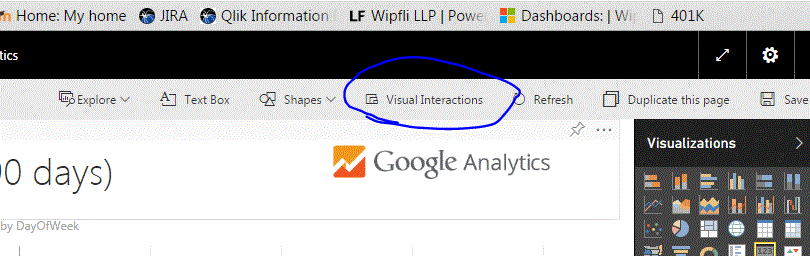
Also, if you want this parameter to only influnce one visual, then you can use the Visual Interactions options to control that as well.
Hope this helps,
Nate
No, I am a beginner. I think It can be usefull. I guess it will only work for time parameters. I am keen to see, if can be used separatety for each page within the report.
But thanks, very much.
Join us in Barcelona for FabCon and SQLCon, the Fabric, Power BI, SQL, and AI community event. Save €200 with code FABCMTY200.
Join Fabric Data Days 2026: 60 days of free live/on-demand sessions, challenges, study groups, and certification opportunities.
| User | Count |
|---|---|
| 65 | |
| 41 | |
| 40 | |
| 39 | |
| 39 |