cancel
Showing results for 
Search instead for 
Did you mean: 

Data Days is here! Join us now for 60+ days of learning, challenges, and connection. Learn more

Reply
pstanek
Post Patron
Post Patron

Measure with parameter

Is it possible to create measure with  Parameter.

For example

pcena  = Calculate(
SUM(movement[pcena]);
FILTER(movement; movement[date] >= DATE(2016;3;14) && movement[date] <=DATE(2016;4;30)))

If I want to change dates, I will have to create another measure.

It would be nice to have 

pcena(start,end)  = Calculate(
SUM(movement[pcena]);
FILTER(movement; movement[date] >= start && movement[date] <=end)).


Evaluation would be

pcena(DATE(2016;3;14) ,DATE(2016;4;30)).


4 REPLIES 4
v-caliao-msft
Microsoft Employee
Microsoft Employee

Hi Pstanek,


According to your description, you need to add parameters to the DAX expression when creating a measure, right?


Based on my research, referencing parameters is currently supported via the Data Source dialogs, Filter Rows, Keep Rows (top/bottom, etc.), Remove Rows (top/bottom, etc.) and Replace Values. So it seems that it is not supported to use a parameter in measure.
https://powerbi.microsoft.com/en-us/blog/power-bi-desktop-april-update-feature-summary/


If you have any concern on this feature, you can submit your idea on the link below. If this feature was mentioned by mulitple users, product team will consider to add this feature to next release.
https://ideas.powerbi.com/forums/265200-power-bi-ideas


Regards,

Charlie Liao

Sean
Community Champion
Community Champion

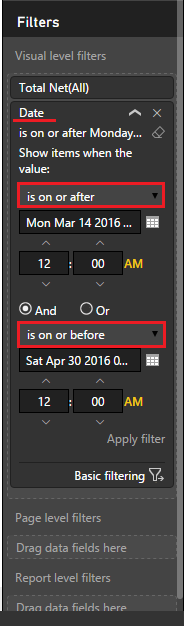
@pstanek Easiest thing to do is to drag your [Date] field to either the Visual or Page Level Filter


This way you can change the Date range for only the selected Visualization or the whole page


then click advanced filtering and select the dates from the calendar

Date Filter.png


Nhallquist
Helper V
Helper V

Have you tried using a Slicer for this?  There is a custom Visual that will most likely help you out on this.  You can down load the custom visual here.  To learn more about the Timeline Slicer, you can read about it here


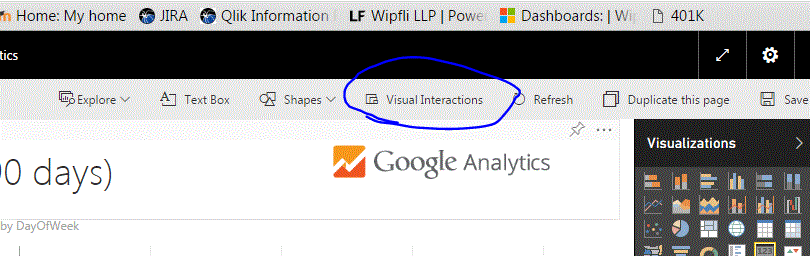
Also, if you want this parameter to only influnce one visual, then you can use the Visual Interactions options to control that as well.

Visual Interactions.GIF


Hope this helps,


Nate

No, I am a beginner. I think It can be usefull. I guess it will only work for time parameters. I am keen to see, if  can be used separatety for each page within the report.

But thanks,  very much.

Helpful resources

Announcements
Fabric Data Days is here Carousel

Fabric Data Days 2026

Don't miss out on Data Days, June 15 through August 7. Learn Fabric, Power BI, SQL, AI and more.

May Power BI Update Carousel

Power BI Monthly Update - May 2026

Check out the May 2026 Power BI update to learn about new features.

Power BI DataViz World Championships carousel

Power BI DataViz World Championships - June 2026

A new Power BI DataViz World Championship is coming this June! Don't miss out on submitting your entry.