cancel
Showing results for 
Search instead for 
Did you mean: 

The Power BI Data Visualization World Championships is back! It's time to submit your entry. Live now!

Reply
Anonymous
Not applicable

Measure error

Greetings,


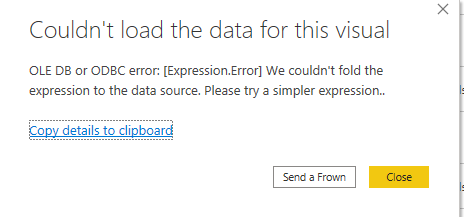
I have imported data through direct query and i want to apply count measure on customers name. But it is now showing the results. Can any one help?error.PNG

2 REPLIES 2
v-angzheng-msft
Community Support
Community Support

Hi, @Anonymous 


According to the error message, the error occurred in your expression, which is related to the native query and query folding, please check your expression and retry.

https://www.mssqltips.com/sqlservertip/4563/power-bi-native-query-and-query-folding/


Hope this helps.


Best Regards,
Community Support Team _ Zeon Zheng
If this post helps, then please consider Accept it as the solution to help the other members find it more quickly.

negi007
Community Champion
Community Champion

@Anonymous Not sure at which stage you are geting the error. you may find solution in below post


https://community.powerbi.com/t5/Power-Query/Azure-quot-cannot-load-the-data-for-this-visual-quot/m-p/791


if you still face the problem, please share some sample data and screenshot of the table relationship/fields


Did I answer your question? Mark my post as a solution!
Appreciate your Kudos


Proud to be a Super User!


Follow me on linkedin

Helpful resources

Announcements
FabCon Atlanta 2026 carousel

FabCon Atlanta 2026

Join us at FabCon Atlanta, March 16-20, for the ultimate Fabric, Power BI, AI and SQL community-led event. Save $200 with code FABCOMM.