Get certified for free when you join Fabric Data Days 2026 and dive into Fabric, Power BI, SQL, AI, and other essential data skills.
Join nowJuly 7 - July 17 | Round 2 of the Power BI Dataviz World Championships. Don't miss your chance! Learn more
Greetings,
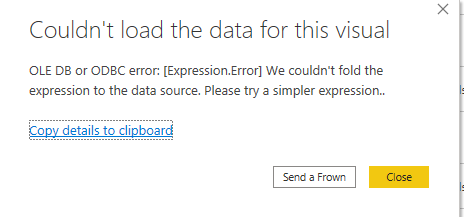
I have imported data through direct query and i want to apply count measure on customers name. But it is now showing the results. Can any one help?
Hi, @Anonymous
According to the error message, the error occurred in your expression, which is related to the native query and query folding, please check your expression and retry.
https://www.mssqltips.com/sqlservertip/4563/power-bi-native-query-and-query-folding/
Hope this helps.
Best Regards,
Community Support Team _ Zeon Zheng
If this post helps, then please consider Accept it as the solution to help the other members find it more quickly.
@Anonymous Not sure at which stage you are geting the error. you may find solution in below post
if you still face the problem, please share some sample data and screenshot of the table relationship/fields
Proud to be a Super User!
Join us in Barcelona for FabCon and SQLCon, the Fabric, Power BI, SQL, and AI community event. Save €200 with code FABCMTY200.
Join Data Days 2026: 60 days of free live/on-demand sessions, challenges, study groups, and certification opportunities.
| User | Count |
|---|---|
| 29 | |
| 27 | |
| 26 | |
| 24 | |
| 16 |
| User | Count |
|---|---|
| 53 | |
| 47 | |
| 39 | |
| 31 | |
| 21 |