Don't miss your chance to take the Fabric Data Engineer (DP-700) exam on us!
Learn moreThe FabCon + SQLCon recap series starts April 14th at 8am Pacific. If you’re tracking where AI is going inside Fabric, this first session is a can't miss. Register now
Hi
I have a table which contains similar info:
Slicer1Slicer2Slicer3Value
| # | A | 07.2020 | 12 |
| # | B | 07.2020 | 14 |
| C1 | A | 07.2020 | 21 |
| C2 | A | 07.2020 | 23 |
| D1 | B | 07.2020 | 32 |
| D2 | B | 07.2020 | 34 |
| # | A | 08.2020 | 42 |
| # | B | 08.2020 | 44 |
| C1 | A | 08.2020 | 55 |
| C2 | A | 08.2020 | 35 |
| D1 | B | 08.2020 | 46 |
| D2 | B | 08.2020 | 65 |
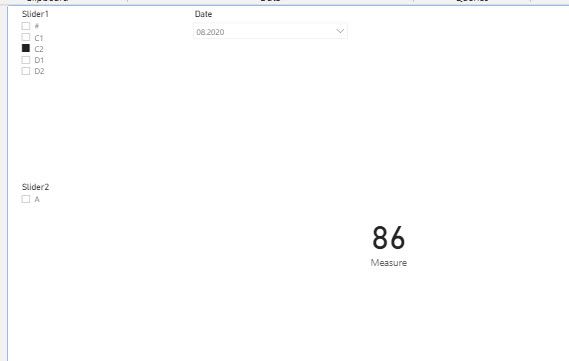
I have 3 slicers. For example; when I select slicer3 as "08.2020" and Slicer2 as "B", I want to see value 44. I could not do it. I wrote a dax Measure=SUM(Table[Value]) but It calculates 44+46+65. How could I do it?
Best
Solved! Go to Solution.
hi @IF
What is the logic of your expected output?
for case 1, when you select slicer3 as "08.2020" and Slicer2 as "B", not select Slicer1, you want to see value 44 (that means you just want to see "#" in slicer1 )
but for case 2, If I use slicer2 it works, but it doesn't work when I use slicer1. what is your logic of this case?
Regards,
Lin
@IF , While this working correctly, I doubt you need # Only
calculate(sum(Table[Value]) , filter(Table, Table[Slicer1]= "#"))
or
calculate(sum(Table[Value]) , Table[Slicer1]= "#")
Other should filter automatically
Hi,
Thanks but it doesn't work. If I use slicer2 it works, but it doesn't work when I use slicer1. It always shows 86 if nothing is selected in slicer2.
hi @IF
What is the logic of your expected output?
for case 1, when you select slicer3 as "08.2020" and Slicer2 as "B", not select Slicer1, you want to see value 44 (that means you just want to see "#" in slicer1 )
but for case 2, If I use slicer2 it works, but it doesn't work when I use slicer1. what is your logic of this case?
Regards,
Lin
Hi,
It is solved with support of Ikalawski.
All the best
@IF - Seems like you want an AND slicer, like this one:
https://community.powerbi.com/t5/Quick-Measures-Gallery/Patient-Cohort-AND-Slicer/m-p/391883#M130
Hi,
Thanks for sharing, but I don't know how to do it in this scenario.
Best
If you have recently started exploring Fabric, we'd love to hear how it's going. Your feedback can help with product improvements.
A new Power BI DataViz World Championship is coming this June! Don't miss out on submitting your entry.
Share feedback directly with Fabric product managers, participate in targeted research studies and influence the Fabric roadmap.
| User | Count |
|---|---|
| 53 | |
| 39 | |
| 37 | |
| 19 | |
| 18 |
| User | Count |
|---|---|
| 67 | |
| 66 | |
| 34 | |
| 32 | |
| 29 |