Get certified for free when you join Fabric Data Days 2026 and dive into Fabric, Power BI, SQL, AI, and other essential data skills.
Join nowTry your skills in the Power BI Dataviz World Championship! Round one ends June 26. Join now
Hi
I have a table which contains similar info:
Slicer1Slicer2Slicer3Value
| # | A | 07.2020 | 12 |
| # | B | 07.2020 | 14 |
| C1 | A | 07.2020 | 21 |
| C2 | A | 07.2020 | 23 |
| D1 | B | 07.2020 | 32 |
| D2 | B | 07.2020 | 34 |
| # | A | 08.2020 | 42 |
| # | B | 08.2020 | 44 |
| C1 | A | 08.2020 | 55 |
| C2 | A | 08.2020 | 35 |
| D1 | B | 08.2020 | 46 |
| D2 | B | 08.2020 | 65 |
I have 3 slicers. For example; when I select slicer3 as "08.2020" and Slicer2 as "B", I want to see value 44. I could not do it. I wrote a dax Measure=SUM(Table[Value]) but It calculates 44+46+65. How could I do it?
Best
Solved! Go to Solution.
hi @IF
What is the logic of your expected output?
for case 1, when you select slicer3 as "08.2020" and Slicer2 as "B", not select Slicer1, you want to see value 44 (that means you just want to see "#" in slicer1 )
but for case 2, If I use slicer2 it works, but it doesn't work when I use slicer1. what is your logic of this case?
Regards,
Lin
@IF , While this working correctly, I doubt you need # Only
calculate(sum(Table[Value]) , filter(Table, Table[Slicer1]= "#"))
or
calculate(sum(Table[Value]) , Table[Slicer1]= "#")
Other should filter automatically
Hi,
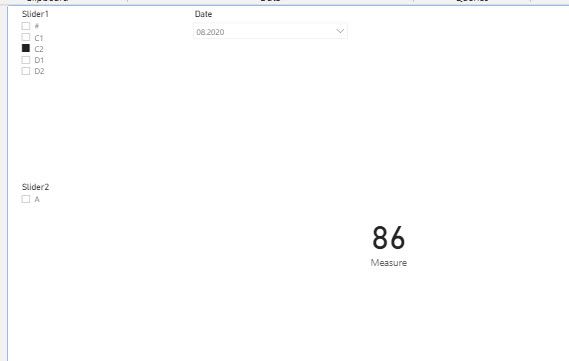
Thanks but it doesn't work. If I use slicer2 it works, but it doesn't work when I use slicer1. It always shows 86 if nothing is selected in slicer2.
hi @IF
What is the logic of your expected output?
for case 1, when you select slicer3 as "08.2020" and Slicer2 as "B", not select Slicer1, you want to see value 44 (that means you just want to see "#" in slicer1 )
but for case 2, If I use slicer2 it works, but it doesn't work when I use slicer1. what is your logic of this case?
Regards,
Lin
Hi,
It is solved with support of Ikalawski.
All the best
@IF - Seems like you want an AND slicer, like this one:
https://community.powerbi.com/t5/Quick-Measures-Gallery/Patient-Cohort-AND-Slicer/m-p/391883#M130
Hi,
Thanks for sharing, but I don't know how to do it in this scenario.
Best
| User | Count |
|---|---|
| 24 | |
| 22 | |
| 22 | |
| 18 | |
| 13 |
| User | Count |
|---|---|
| 68 | |
| 55 | |
| 45 | |
| 42 | |
| 30 |